
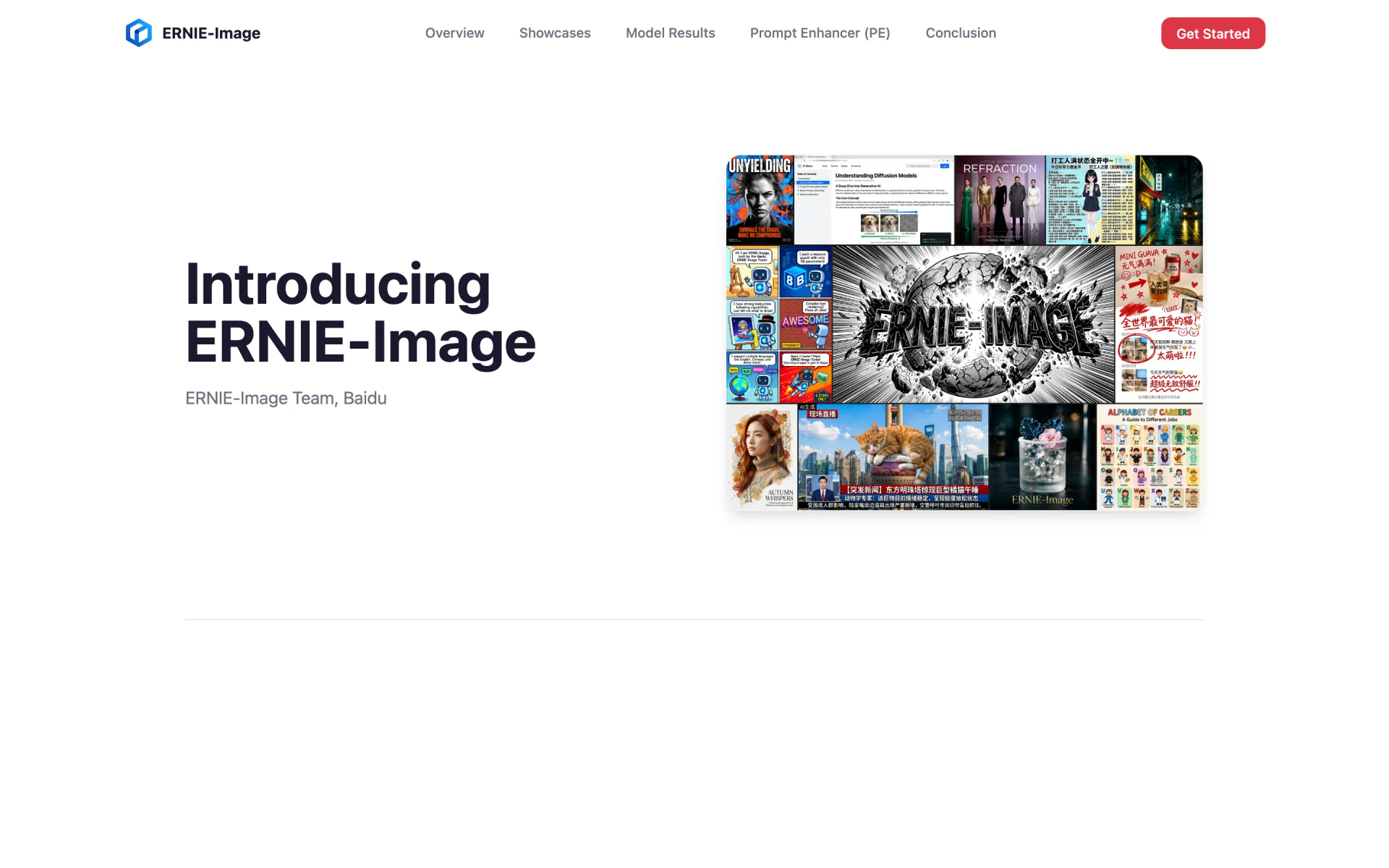
What is ERNIE-Image?
ERNIE-Image (Baidu writes it ERNIE-Image) is an 8B diffusion transformer from Baidu's ERNIE team, released as open weights in two versions: the base model, which takes about 50 steps per image, and Turbo, which takes 8. A 3B prompt enhancer expands short prompts into detailed ones before drawing.
Baidu built it for images where layout and text matter, such as posters, comics, storyboards and infographics, and its own tables put it first among open-weight models on four benchmarks. No newer version has replaced it, and it only makes images from text: unlike GLM-Image and Qwen-Image-3.0, it cannot edit.
Who is ERNIE-Image best for?
ERNIE-Image suits designers and developers who need readable text in posters and ads, comics and storyboards, and a free model they can run and fine-tune on their own 24GB GPU.
Posters and ads with real copy
It renders dense, long text in Chinese and English, and placed second on LongText-Bench in Baidu's table, just behind Seedream 4.5.
Comics and storyboards
Baidu tuned it for multi-panel layouts, keeping characters, expressions and pacing coherent from frame to frame.
Image generation on your own GPU
It fits on a 24GB card, and the Apache 2.0 licence lets you run it without paying Baidu or sending prompts anywhere.
Training a house style
AI-Toolkit supports fine-tuning it, and Baidu says its moderate size makes adaptation straightforward.
What's included with ERNIE-Image?
A base and an 8-step Turbo checkpoint, a built-in prompt enhancer, multilingual text rendering, seven preset sizes and support in diffusers, SGLang and ComfyUI.
- Two checkpoints
- The base model aims for quality and instruction fidelity in about 50 steps; Turbo, tuned with distillation and reinforcement learning, needs 8.
- Prompt enhancer
- A built-in 3B model rewrites short prompts into structured ones; you can switch it off or use a larger LLM instead.
- Multilingual text rendering
- Readable Chinese, English and other text, from titles and captions to full paragraphs.
- Seven preset sizes
- Square, portrait and landscape outputs, from 1024x1024 to 1376x768 and 768x1376.
- Works in common tools
- Runs in diffusers, SGLang and ComfyUI, with GGUF builds from Unsloth and fine-tuning in AI-Toolkit.
- Free hosted demos
- Try the Turbo version on Hugging Face or Baidu AI Studio, which also offers an OpenAI-compatible API.
How much does ERNIE-Image cost?
ERNIE-Image is free: the weights are Apache 2.0 on Hugging Face and ModelScope, and Baidu runs free demos on Hugging Face and AI Studio, with no paid plan.
- Apache 2.0 licence for the weights and code
- Base and Turbo versions on Hugging Face and ModelScope
- Runs on a GPU with 24GB of memory
- Runs the Turbo version
- AI Studio needs a Baidu account to generate
Baidu has no paid plan or pricing page for ERNIE-Image. Baidu AI Studio also serves the Turbo version through an OpenAI-compatible API, and each developer gets 1 million free tokens there; the price of extra tokens shows only after you sign in. Hugging Face lists fal as a paid host. Running it yourself costs only your own GPU time. Full pricing on huggingface.co. We checked these prices on .
How do readers rate ERNIE-Image?
No one has rated ERNIE-Image yet. Be the first.
Sign in to rate. One rating per account.
ERNIE-Image pros and cons
It leads open models on text and complex prompts, but testers report anatomy errors, a default to Asian faces and weaker art styles than Z-Image.
Pros
- Renders long, dense text in Chinese and English better than other open models, which both Baidu's benchmarks and Reddit testers back up.
- Follows complex prompts with several objects and interactions closely; testers found it ahead of Z-Image here.
- Apache 2.0 weights that run on a 24GB card, with ComfyUI support and LoRA training from launch.
- Handles anime, pixel art and illustration well, according to several testers.
Cons
- Testers report broken anatomy, such as extra or bent limbs and long fingers, more often than with Z-Image.
- The Turbo version draws Asian faces by default unless the prompt says otherwise, which several users found hard to steer.
- Photorealism and named art styles lag Z-Image in side-by-side tests, and the prompt enhancer can drift from exact prompts, so some users switch it off.
- Text-to-image only, with no editing model, and the base model is slow at about 50 steps per image.
Is ERNIE-Image open source?
Yes. ERNIE-Image's code is public under the Apache 2.0 licence, so you can run it on your own server.
On GitHub
518stars
- Last commit
- 17 Apr
- Repository age
- 7 months
- Licence
- Apache 2.0
- Self-hosted
- Yes
- Repository
- baidu/ERNIE-Image
What are the best ERNIE-Image alternatives?
ERNIE-Image is an open source alternative to GPT Image 2, Ideogram, FLUX 3 Image Klein and Qwen-Image-3.0. Z-Image and GLM-Image do the same job and are open source too.
 GPT Image 2Paid
OpenAI's image model for developers who generate and edit images through the API, up to 4K.
 IdeogramFree
Image generation that gets the text right.
 FLUX 3 Image KleinFree
Black Forest Labs' 5.6B open-weights model for image edits, text-to-image and box layouts on one GPU.
 Qwen-Image-3.0Freemium
Choose it when you would rather pay per image than run a GPU and want editing in the same model; it costs about $0.025 an image in Model Studio's US region.
 Z-ImageOpen Source
Choose it when photorealism and art styles matter more than text: testers rated it better at both, and its Turbo version fits in 16GB of graphics memory under the same Apache 2.0 licence.
 GLM-ImageOpen Source
Choose it when you also need to edit images or want a hosted API at $0.015 an image; running it yourself needs more than 80GB of GPU memory, on one card or several.
Questions about ERNIE-Image
What is the difference between ERNIE-Image and ERNIE-Image Turbo?
The base model is tuned for quality and instruction following and takes about 50 steps. Turbo is distilled and tuned with reinforcement learning to need only 8 steps, and Baidu says it looks more polished. In Baidu's benchmark tables the base model scores slightly higher on most tests.
Who is ERNIE-Image for?
ERNIE-Image suits designers and developers who need readable text in posters and ads, comics and storyboards, and a free model they can run and fine-tune on their own 24GB GPU.
Is ERNIE-Image free?
Yes. ERNIE-Image has a free Open weights plan: apache 2.0 licence for the weights and code.
Is ERNIE-Image open source?
Yes. ERNIE-Image's code is public under the Apache 2.0 licence, so you can run it on your own server.
What are the best ERNIE-Image alternatives?
The closest alternatives on Recaply are GPT Image 2, Ideogram, FLUX 3 Image Klein, Qwen-Image-3.0, Z-Image and GLM-Image.
Where can I try ERNIE-Image?
On its official website, ernie.baidu.com.
Can I use ERNIE-Image for commercial work?
The weights and code are released under Apache 2.0, which allows commercial use, and Baidu's model card mentions commercial posters. Baidu's launch blog also says the model is intended for non-commercial personal creation, so read the licence and ask Baidu before client work.
What GPU do I need to run ERNIE-Image?
Baidu says it runs on consumer graphics cards with 24GB of memory. Turbo needs 8 steps per image and the base model about 50, so Turbo is the practical choice on home hardware. Unsloth also publishes GGUF builds for tools that use that format.
Can ERNIE-Image edit photos?
No. It only generates images from text prompts. Baidu has released the base and Turbo text-to-image checkpoints and a separate aesthetic scoring model, but no editing model. For editing, look at GLM-Image or Qwen-Image-3.0.
ERNIE-Image vs Z-Image: which is better?
It depends on the job. In Reddit comparisons, ERNIE-Image wins on text and complex prompts, while Z-Image wins on photorealism, named art styles and anatomy. Both are Apache 2.0, and Z-Image-Turbo fits in 16GB of graphics memory against ERNIE-Image's 24GB.
Our verdict
ERNIE-Image is the open model to try first when an image has to carry readable text.
Baidu's benchmarks and early testers agree it leads open models on text rendering and complex prompts, and it runs free on a 24GB GPU.
- Skip it for
- Photoreal portraits and fine art styles, where testers prefer Z-Image, and any job that needs image editing.
- Check first
- Read the Apache 2.0 licence against the non-commercial line in Baidu's blog before client work, and test hands and poses on your own prompts.

 Hunyuan Image 3.0

 MAI-Image-2
 Canva Craft

 MAI-Image-2-Efficient
 EVF-SAM-2

 Bonsai Image 4B