Skip to content

DirectorySkills

Two-phone mockup: 1440, made in this run
Run 1Two-phone mockup“Show two screens of our meal-planning app in phone frames on the landing page. Details in brief.md.”
Runs in
  • Claude Code
  • Codex
  • Cursor
  • Gemini CLI
  • GitHub Copilot
  • OpenCode
Generates with
Your agent's model
Tested with
Claude Code 2.1.322Claude Sonnet 5.51 real run, 10 Nov
Needs
Node 20+Chrome
Licence
Recaply licence

Two-Phone Mockup

An app showcase with two overlapping phone frames showing real-looking screens, beside the pitch, features and download buttons.

$9.99once, yours to keep

Builds an app showcase section with two phone mockups into your own project: on a soft sage section, the pitch on the left (label, heading, line, three features with icons, two download buttons and a rating line); on the right two generic phone frames overlap, the back one tilted left showing the week's chart, the front one tilted right showing today's habit list; they part a little as you scroll. Plain HTML, CSS and JavaScript, or matched to React, Next.js, Vue, Svelte, Astro or Tailwind when the project uses them. Comes with a working reference and a check that screenshots it at phone, tablet and desktop widths and flags sideways overflow, text under 12px, missing alt text and names, low contrast, no focus styles, motion that ignores reduced motion, leftover sample words and emoji icons. Use when a mobile app's site or a product page wants to show two app screens in phone frames, or someone asks for a phone mockup, app screens showcase or two-phone hero section.

By RecaplyUpdated 12 Nov

Install Two-Phone Mockup

After the download, ask your agent to add it, or run the line yourself.

Read https://recaply.co/skills/two-phone-mockup/install.md and follow it to install the two-phone-mockup skill from two-phone-mockup.zip.

Paste it into your agent. It reads our install steps, finds the ZIP you downloaded and adds the skill for you.

New to skills? How to install a skill

Similar skills

All 735 skills

Who Two-Phone Mockup is for

What you get

  • One HTML file with its CSS inside: no build step, no framework
  • An app showcase section with two phone mockups
  • Checked at phone and desktop widths

Good fit

  • When a mobile app's site or a product page wants to show two app screens in phone frames

Not for

  • An app with a backend, sign-in or a database
  • Copying another company's site

About this skill

You say

Show two screens of our meal-planning app in phone frames on the landing page. Details in brief.md.

It said back

The two-phone section is built as a plain HTML/CSS/JS page in tomato red and cream. It passes the check at 390, 768 and 1440px: no sideways overflow, text no smaller than 12px, no contrast, focus or reduced-motion failures, and no script errors.

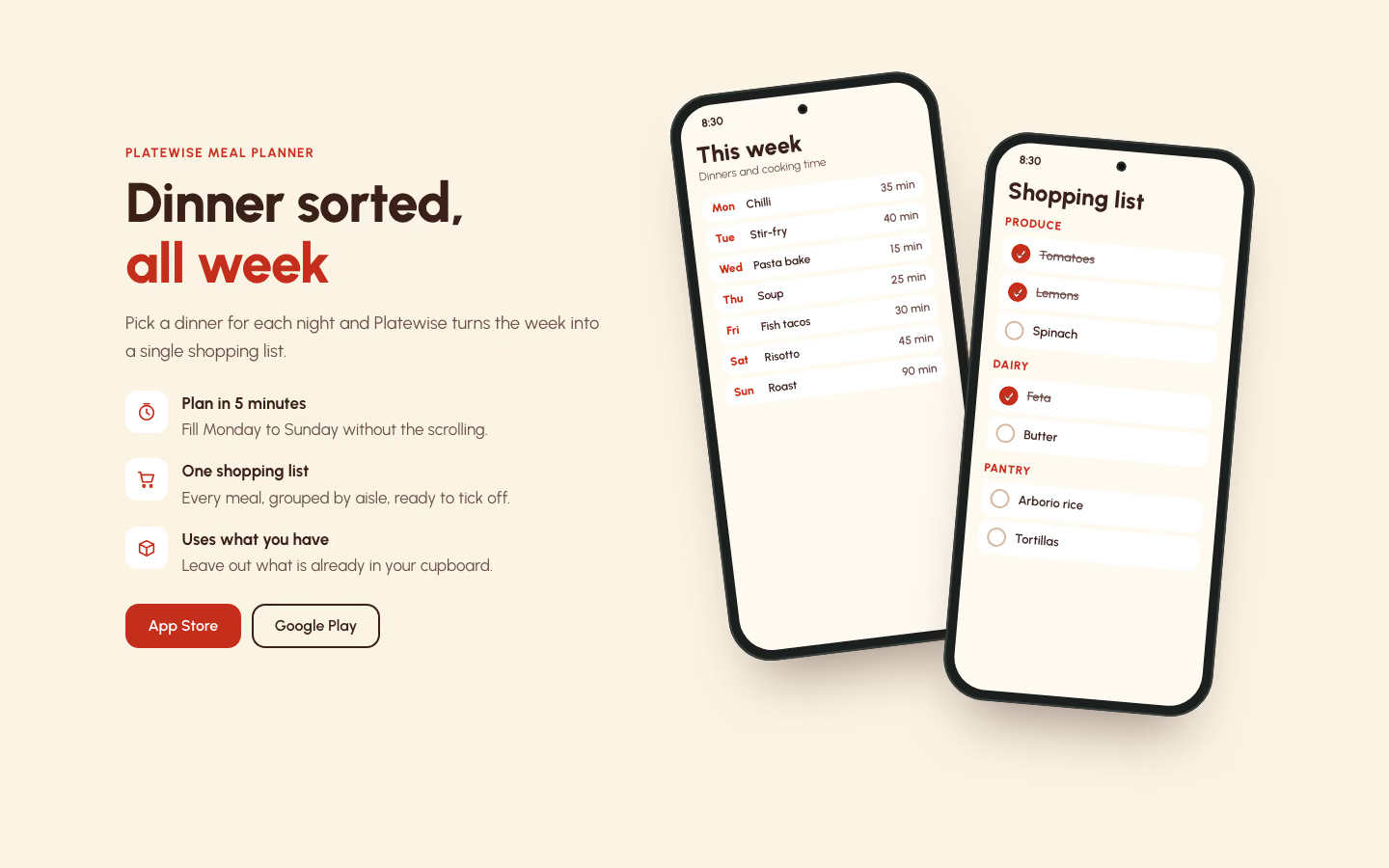
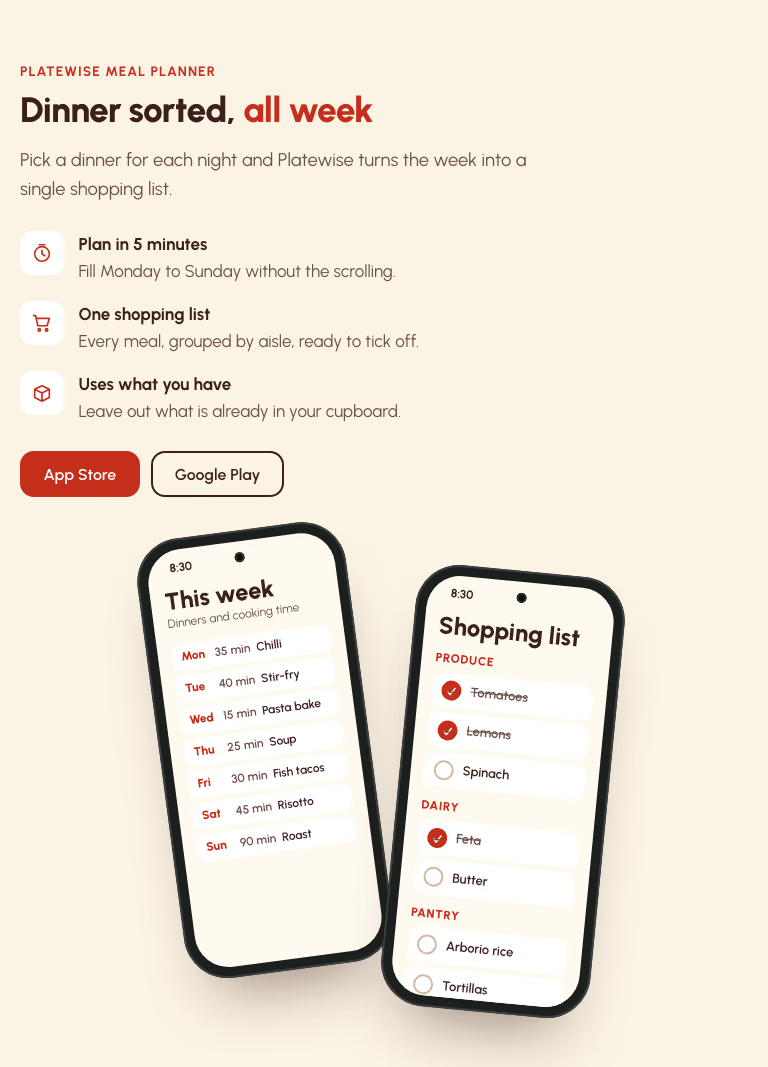
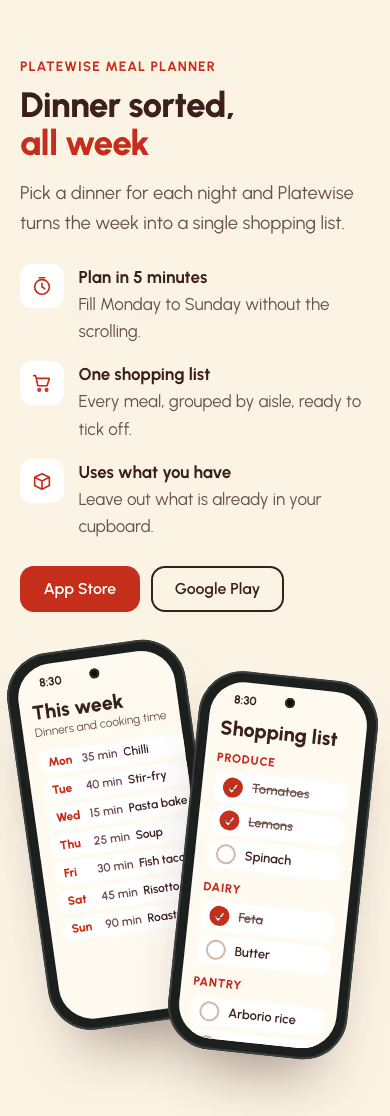
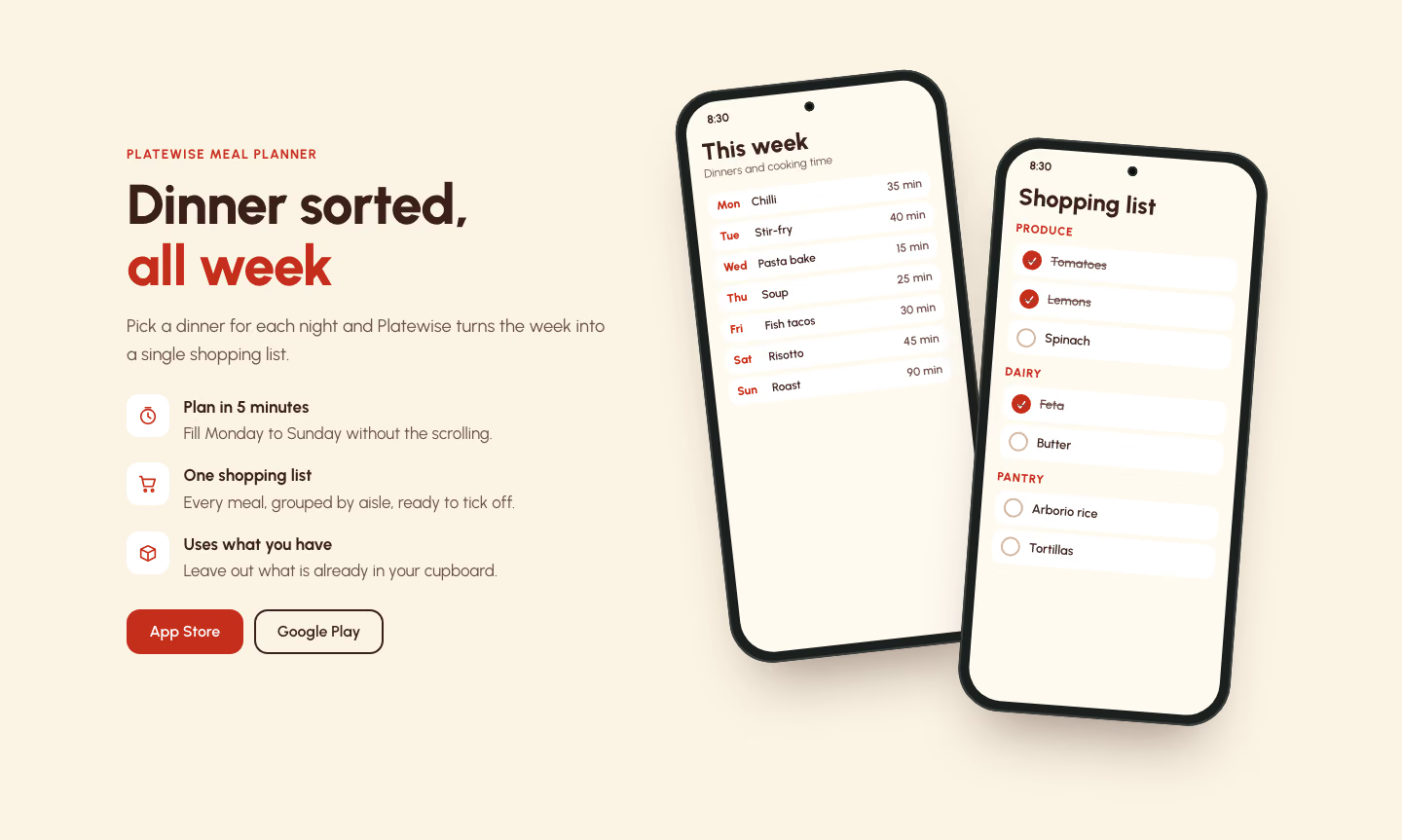
I looked at the 1440 and 390 screenshots. On desktop the back phone shows this week's dinners Monday to Sunday with cooking times, and the front phone shows the shopping list grouped by aisle (Produce, Dairy, Pantry) with some items ticked. On mobile the front phone covers the right edge of the back phone. The cooking times stay visible, and long dish names are cut off there. I did not open check/768.png.

Show more

What it did in run 1

  1. two-phone-mockup
  2. ./brief.md
  3. cd .; ls -la; ls .claude/skills/two-phone-mockup/reference; cat .claude/skills/two-phone-mockup/reference/index.html .claude/skills/two-phone-mockup/reference/style.css .claude/skills/two-phone-mockup/reference/script.js
  4. cd . R=.claude/skills/two-phone-mockup/reference cp $R/script.js script.js python3 - <<'EOF' import re R='.claude/skills/two-phone-mockup/reference/' c=open(R+'style.css').read() c=c.replace('--bg:#E7EFE6','--bg:#FBF3E4').replace('--ink:#173A2C','--ink:#3B1F19').replace('--muted:#4B6157','--muted:#6A4F47').replace('--line:#CFDDCF','--line:#EBD9C0').replace('--accent:#1F6B4A','--accent:#C42F1C').replace('--em:#1F6B4A','--em:#C42F1C').replace('--screen:#FBFAF5','--screen:#FFFAF0') c=c.replace('rgba(23,58,44,.55)','rgba(59,31,25,.5)') # cut old screen styles from .wk to .ring b and replace i=c.index('.wk{'); j=c.index('@media (max-width:960px)') new='''.dn{display:grid;gap:5px;margin-top:10px} .dn li{display:flex;align-items:center;gap:8px;background:#fff;border-radius:10px;padding:6px 9px;font-size:12px;font-weight:600;line-height:1.25} .dn .d{width:28px;flex:none;color:var(--accent);font-weight:800} .dn .m{flex:1;min-width:0} .dn .t{color:var(--muted);font-weight:600;white-space:nowrap} .ai{font-size:12px;font-weight:800;letter-spacing:.06em;text-transform:uppercase;color:var(--accent);margin:10px 0 4px} .hl{display:grid;gap:5px} .hl li{display:flex;align-items:center;gap:9px;background:#fff;border-radius:10px;padding:7px 9px;font-size:13px;font-weight:600} .hl .ck{width:20px;height:20px;border-radius:50%;border:2px solid #D3B9A2;display:grid;place-items:center;font-size:12px;color:#fff;flex:none} .hl .done .ck{background:var(--accent);border-color:var(--accent)} .hl .done{color:var(--muted);text-decoration:line-through} ''' c=c[:i]+new+c[j:] c=c.replace('.scr .sub2{font-size:13px;color:var(--muted);margin-bottom:12px}','.scr .sub2{font-size:12px;color:var(--muted)}') c=c.replace('padding:40px 16px 16px;overflow:hidden','padding:38px 14px 14px;overflow:hidden') c=c.replace('.scr .h{font-size:20px}','.scr .h{font-size:20px}.dn li,.hl li{padding-block:5px}') c=c.replace('.tp-rate{margin-top:1rem;color:var(--muted)}\n','') open('style.css','w').write(c) EOF ic(){ echo "<svg class=\"ic\" width=\"24\" height=\"24\" viewBox=\"0 0 24 24\" fill=\"none\" stroke=\"currentColor\" stroke-width=\"1.8\" stroke-linecap=\"round\" stroke-linejoin=\"round\" aria-hidden=\"true\" focusable=\"false\">$1</svg>"; } li(){ echo "<li>$(ic "$1")<span><b>$2</b>$3</span></li>"; } day(){ echo "<li><span class=\"d\">$1</span><span class=\"m\">$2</span><span class=\"t\">$3</span></li>"; } it(){ echo "<li class=\"$1\"><span class=\"ck\">$2</span>$3</li>"; } cat > index.html <<EOF <!doctype html> <html lang="en"> <head> <meta charset="utf-8"> <meta name="viewport" content="width=device-width, initial-scale=1"> <title>Platewise meal planner</title> <meta name="description" content="Plan your week of dinners in 5 minutes and get one shopping list that uses what you already have."> <link rel="preconnect" href="https://fonts.googleapis.com"> <link rel="preconnect" href="https://fonts.gstatic.com" crossorigin> <link rel="stylesheet" href="https://fonts.googleapis.com/css2?family=Urbanist:wght@400;500;600;700;800&display=swap"> <link rel="stylesheet" href="style.css"> </head> <body> <a class="skip" href="#main">Skip to content</a> <main id="main"> <section class="p-sec tp" id="app" aria-labelledby="app-h"><div class="wrap tp-in"><div class="tp-copy"><p class="label">Platewise meal planner</p><h2 id="app-h">Dinner sorted, <em>all week</em></h2><p class="tp-lede">Pick a dinner for each night and Platewise turns the week into a single shopping list.</p><ul class="tp-feats"> $(li '<circle cx="12" cy="13" r="8"/><path d="M12 9v4l3 2M9 3h6"/>' 'Plan in 5 minutes' 'Fill Monday to Sunday without the scrolling.') $(li '<path d="M3 4h2l2.5 11h10L20 7H6.5"/><circle cx="9" cy="19.5" r="1.3"/><circle cx="17" cy="19.5" r="1.3"/>' 'One shopping list' 'Every meal, grouped by aisle, ready to tick off.') $(li '<path d="M4 8l8-4 8 4v9l-8 4-8-4zM4 8l8 4 8-4M12 12v9"/>' 'Uses what you have' 'Leave out what is already in your cupboard.') </ul><div class="tp-acts"><!-- TODO: replace # with the real store links --><a class="btn btn-primary" href="#">App Store</a><a class="btn btn-ghost" href="#">Google Play</a></div></div><div class="tp-stage" role="img" aria-label="Two phones showing Platewise: this week's dinners from Monday to Sunday with cooking times, and the shopping list grouped by aisle with some items ticked."><div class="ph back" aria-hidden="true"><div class="scr"><p class="st">8:30</p><p class="h">This week</p><p class="sub2">Dinners and cooking time</p><ul class="dn"> $(day Mon 'Veggie chilli' '35 min') $(day Tue 'Lemon chicken' '40 min') $(day Wed 'Pesto pasta' '15 min') $(day Thu 'Tomato soup' '25 min') $(day Fri 'Fish tacos' '30 min') $(day Sat 'Mushroom risotto' '45 min') $(day Sun 'Sunday roast' '90 min') </ul></div></div><div class="ph front" aria-hidden="true"><div class="scr"><p class="st">8:30</p><p class="h">Shopping list</p><p class="ai">Produce</p><ul class="hl"> $(it done ✓ Tomatoes) $(it done ✓ Lemons) $(it '' '' Spinach) </ul><p class="ai">Dairy</p><ul class="hl"> $(it done ✓ Feta) $(it '' '' Butter) </ul><p class="ai">Pantry</p><ul class="hl"> $(it '' '' 'Arborio rice') $(it '' '' 'Tortillas') </ul></div></div></div></div></section> </main> <script src="script.js" defer></script> </body> </html> EOF node .claude/skills/two-phone-mockup/scripts/check.mjs index.html --out check 2>&1 | tail -30
  5. cd . cp .claude/skills/two-phone-mockup/reference/script.js script.js cat > /tmp/mk.py <<'EOF' R='.claude/skills/two-phone-mockup/reference/' c=open(R+'style.css').read() for a,b in [('--bg:#E7EFE6','--bg:#FBF3E4'),('--ink:#173A2C','--ink:#3B1F19'),('--muted:#4B6157','--muted:#6A4F47'),('--line:#CFDDCF','--line:#EBD9C0'),('--accent:#1F6B4A','--accent:#C42F1C'),('--em:#1F6B4A','--em:#C42F1C'),('--screen:#FBFAF5','--screen:#FFFAF0'),('rgba(23,58,44,.55)','rgba(59,31,25,.5)')]: c=c.replace(a,b) i=c.index('.wk{'); j=c.index('@media (max-width:960px)') new='''.dn{display:grid;gap:5px;margin-top:10px} .dn li{display:flex;align-items:center;gap:8px;background:#fff;border-radius:10px;padding:6px 9px;font-size:12px;font-weight:600;line-height:1.25} .dn .d{width:28px;flex:none;color:var(--accent);font-weight:800} .dn .m{flex:1;min-width:0} .dn .t{color:var(--muted);font-weight:600;white-space:nowrap} .ai{font-size:12px;font-weight:800;letter-spacing:.06em;text-transform:uppercase;color:var(--accent);margin:10px 0 4px} .hl{display:grid;gap:5px} .hl li{display:flex;align-items:center;gap:9px;background:#fff;border-radius:10px;padding:7px 9px;font-size:13px;font-weight:600} .hl .ck{width:20px;height:20px;border-radius:50%;border:2px solid #D3B9A2;display:grid;place-items:center;font-size:12px;color:#fff;flex:none} .hl .done .ck{background:var(--accent);border-color:var(--accent)} .hl .done{color:var(--muted);text-decoration:line-through} ''' c=c[:i]+new+c[j:] c=c.replace('.scr .sub2{font-size:13px;color:var(--muted);margin-bottom:12px}','.scr .sub2{font-size:12px;color:var(--muted)}') c=c.replace('padding:40px 16px 16px;overflow:hidden','padding:38px 14px 14px;overflow:hidden') c=c.replace('.scr .h{font-size:20px}','.scr .h{font-size:20px}.dn li,.hl li{padding-block:5px}') c=c.replace('.tp-rate{margin-top:1rem;color:var(--muted)}\n','') open('style.css','w').write(c) def ic(p): return '<svg class="ic" width="24" height="24" viewBox="0 0 24 24" fill="none" stroke="currentColor" stroke-width="1.8" stroke-linecap="round" stroke-linejoin="round" aria-hidden="true" focusable="false">%s</svg>'%p feats=[('<circle cx="12" cy="13" r="8"/><path d="M12 9v4l3 2M9 3h6"/>','Plan in 5 minutes','Fill Monday to Sunday without the scrolling.'), ('<path d="M3 4h2l2.5 11h10L20 7H6.5"/><circle cx="9" cy="19.5" r="1.3"/><circle cx="17" cy="19.5" r="1.3"/>','One shopping list','Every meal, grouped by aisle, ready to tick off.'), ('<path d="M4 8l8-4 8 4v9l-8 4-8-4zM4 8l8 4 8-4M12 12v9"/>','Uses what you have','Leave out what is already in your cupboard.')] F=''.join('<li>%s<span><b>%s</b>%s</span></li>'%(ic(p),t,d) for p,t,d in feats) days=[('Mon','Veggie chilli','35 min'),('Tue','Lemon chicken','40 min'),('Wed','Pesto pasta','15 min'),('Thu','Tomato soup','25 min'),('Fri','Fish tacos','30 min'),('Sat','Mushroom risotto','45 min'),('Sun','Sunday roast','90 min')] D=''.join('<li><span class="d">%s</span><span class="m">%s</span><span class="t">%s</span></li>'%x for x in days) def it(n,done): return '<li class="%s"><span class="ck">%s</span>%s</li>'%('done' if done else '','✓' if done else '',n) def grp(t,items): return '<p class="ai">%s</p><ul class="hl">%s</ul>'%(t,''.join(it(*i) for i in items)) S=grp('Produce',[('Tomatoes',1),('Lemons',1),('Spinach',0)])+grp('Dairy',[('Feta',1),('Butter',0)])+grp('Pantry',[('Arborio rice',0),('Tortillas',0)]) html='''<!doctype html> <html lang="en"> <head> <meta charset="utf-8"> <meta name="viewport" content="width=device-width, initial-scale=1"> <title>Platewise meal planner</title> <meta name="description" content="Plan your week of dinners in 5 minutes and get one shopping list that uses what you already have."> <link rel="preconnect" href="https://fonts.googleapis.com"> <link rel="preconnect" href="https://fonts.gstatic.com" crossorigin> <link rel="stylesheet" href="https://fonts.googleapis.com/css2?family=Urbanist:wght@400;500;600;700;800&display=swap"> <link rel="stylesheet" href="style.css"> </head> <body> <a class="skip" href="#main">Skip to content</a> <main id="main"> <section class="p-sec tp" id="app" aria-labelledby="app-h"><div class="wrap tp-in"><div class="tp-copy"><p class="label">Platewise meal planner</p><h2 id="app-h">Dinner sorted, <em>all week</em></h2><p class="tp-lede">Pick a dinner for each night and Platewise turns the week into a single shopping list.</p><ul class="tp-feats">'''+F+'''</ul><div class="tp-acts"><!-- TODO: replace # with the real store links --><a class="btn btn-primary" href="#">App Store</a><a class="btn btn-ghost" href="#">Google Play</a></div></div><div class="tp-stage" role="img" aria-label="Two phones showing Platewise: this week's dinners from Monday to Sunday with cooking times, and the shopping list grouped by aisle with some items ticked."><div class="ph back" aria-hidden="true"><div class="scr"><p class="st">8:30</p><p class="h">This week</p><p class="sub2">Dinners and cooking time</p><ul class="dn">'''+D+'''</ul></div></div><div class="ph front" aria-hidden="true"><div class="scr"><p class="st">8:30</p><p class="h">Shopping list</p>'''+S+'''</div></div></div></div></section> </main> <script src="script.js" defer></script> </body> </html> ''' open('index.html','w').write(html) EOF python3 -I /tmp/mk.py && node .claude/skills/two-phone-mockup/scripts/check.mjs index.html --out check 2>&1 | tail -30
  6. /tmp/mk.py
  7. cp .claude/skills/two-phone-mockup/reference/script.js script.js && python3 -I /tmp/mk.py && node .claude/skills/two-phone-mockup/scripts/check.mjs index.html --out check 2>&1 | tail -30
  8. cp .claude/skills/two-phone-mockup/reference/script.js script.js
  9. python3 -I /tmp/mk.py
  10. ./index.html
  11. ./.claude/skills/two-phone-mockup/reference/script.js
  12. ./script.js
  13. ./style.css
  14. node .claude/skills/two-phone-mockup/scripts/check.mjs index.html --out check
  15. ./check/1440.png
  16. ./check/390.png
  17. sed -i '' -e 's/\.ph\.back{left:8%/.ph.back{left:5%/' -e 's/\.ph\.front{left:40%/.ph.front{left:48%/' -e 's/^\.dn \.m{flex:1;min-width:0}/.dn .m{flex:1;min-width:0;white-space:nowrap;overflow:hidden;text-overflow:ellipsis}/' -e 's/^@media (max-width:960px){/@media (max-width:960px){.dn .t{order:2}.dn .m{order:3}.dn li{gap:6px}/' style.css && sed -i '' -e 's/Veggie chilli/Chilli/;s/Lemon chicken/Stir-fry/;s/Pesto pasta/Pasta bake/;s/Tomato soup/Soup/;s/Mushroom risotto/Risotto/;s/Sunday roast/Roast/' index.html && node .claude/skills/two-phone-mockup/scripts/check.mjs index.html --out check
  18. ./style.css
  19. ./style.css
  20. ./style.css
  21. ./style.css
  22. ./index.html
  23. ./index.html
  24. ./index.html
  25. ./index.html
  26. ./index.html
  27. ./index.html
  28. node .claude/skills/two-phone-mockup/scripts/check.mjs index.html --out check
  29. ./check/1440.png
  30. ./check/390.png
  31. Done

10 Nov 2026 · Claude Code 2.1.322 with Claude Sonnet 5.5 · 2 min 34 s · $0.43 of API use

Questions

Is Two-Phone Mockup free?

No. Two-Phone Mockup costs $9.99 once and stays in your Recaply account, or it comes with the Recaply plan ($19.99 a month), which opens every premium skill and prompt.

Which agents can use Two-Phone Mockup?

Claude Code, Codex, Cursor, Gemini CLI, GitHub Copilot and OpenCode.

What do I get when I buy Two-Phone Mockup?

A ZIP of the whole skill folder (32 KB): the SKILL.md your agent follows and its 6 other files, the references, templates and scripts it uses. You download it from this page whenever you need it, and install it in Claude Code, Codex, Cursor, Gemini CLI, GitHub Copilot and OpenCode. The Recaply plan opens it too, with every other premium skill and prompt.

How do I install Two-Phone Mockup?

Buy it, then download the ZIP from this page. For Claude Code, unzip it into .claude/skills/ in your project. For Codex, Cursor and Gemini CLI, unzip it and run npx skills add ./two-phone-mockup with your agent's flag.

What do I get from Two-Phone Mockup?

One HTML file with its CSS inside: no build step, no framework. An app showcase section with two phone mockups. Checked at phone and desktop widths.

What does Two-Phone Mockup need?

Node 20+ and Chrome, and no API key. Each use costs nothing beyond your agent.

How big is Two-Phone Mockup?

7 files, about 20,757 tokens in all. The SKILL.md is about 2,133 tokens, and your agent reads it only when the job fits.

What does a run cost?

Our 1 runs took 2 min 34 s to 2 min 34 s and $0.43 to $0.43 of API use each, in Claude Code with claude-sonnet-5-5. On a Claude plan, a run counts toward your usage instead.

Do I have to name Two-Phone Mockup to use it?

Type /two-phone-mockup first to make sure it loads. Without it, Claude Code may judge a small job simple enough to do without the skill.