Skip to content

DirectorySkills

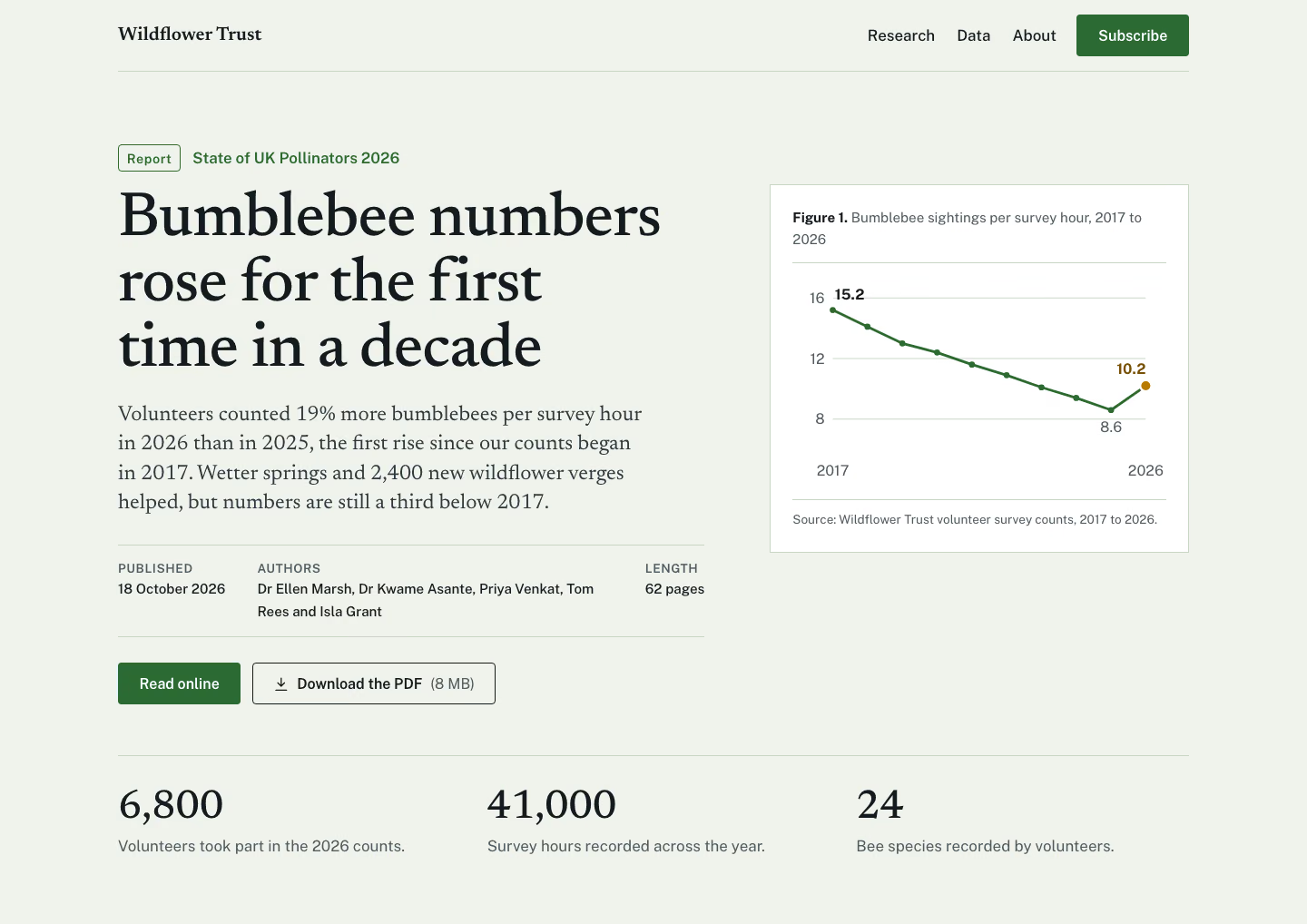
Research report hero: 1440, made in this run
Run 1Research report hero“Build the top of the page for our annual state-of-the-bees report. Details in brief.md.”
Runs in
  • Claude Code
  • Codex
  • Cursor
  • Gemini CLI
  • GitHub Copilot
  • OpenCode
Generates with
Your agent's model
Tested with
Claude Code 2.1.322Claude Sonnet 5.51 real run, 12 Nov
Needs
Node 20+Chrome
Licence
Recaply licence

Research Report Hero

An editorial hero for a published report: big serif title, standfirst, dated byline row, one quiet figure and read or download buttons.

$9.99once, yours to keep

Builds an editorial hero for a research report or white paper into your own project: cool grey-green paper; a large serif title under a report label, a standfirst, a meta row (date, authors, length) between hairlines, Read and Download PDF buttons; one ruled figure (a small bar chart with caption and source) on the right; three key findings below. Plain HTML, CSS and JavaScript, or matched to React, Next.js, Vue, Svelte, Astro or Tailwind when the project uses them. Comes with a working reference and a check that screenshots it at phone, tablet and desktop widths and flags sideways overflow, text under 12px, missing alt text and names, low contrast, no focus styles, motion that ignores reduced motion, leftover sample words and emoji icons. Use when a research team, think tank, charity, consultancy, university or company publishes a report, paper or annual study and wants a serious landing hero for it, or someone asks for a report hero, white paper page header or study launch section.

By RecaplyUpdated 12 Nov

Install Research Report Hero

After the download, ask your agent to add it, or run the line yourself.

Read https://recaply.co/skills/research-report-hero/install.md and follow it to install the research-report-hero skill from research-report-hero.zip.

Paste it into your agent. It reads our install steps, finds the ZIP you downloaded and adds the skill for you.

New to skills? How to install a skill

Similar skills

All 735 skills

Who Research Report Hero is for

What you get

  • One HTML file with its CSS inside: no build step, no framework
  • An editorial hero for a research report or white paper
  • Checked at phone and desktop widths

Good fit

  • When a research team, think tank, charity, consultancy, university or company publishes a report, paper or annual study

Not for

  • An app with a backend, sign-in or a database
  • Copying another company's site

About this skill

You say

Build the top of the page for our annual state-of-the-bees report. Details in brief.md.

It said back

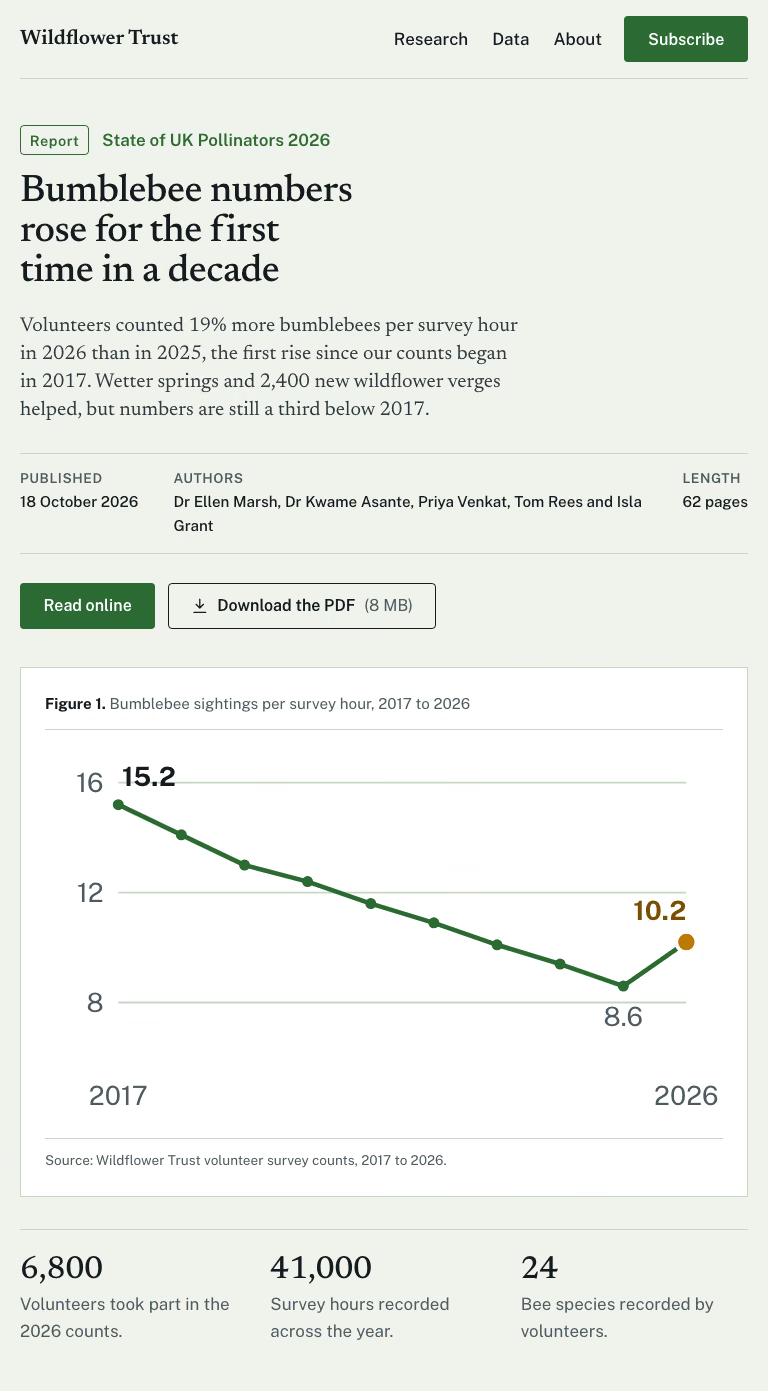
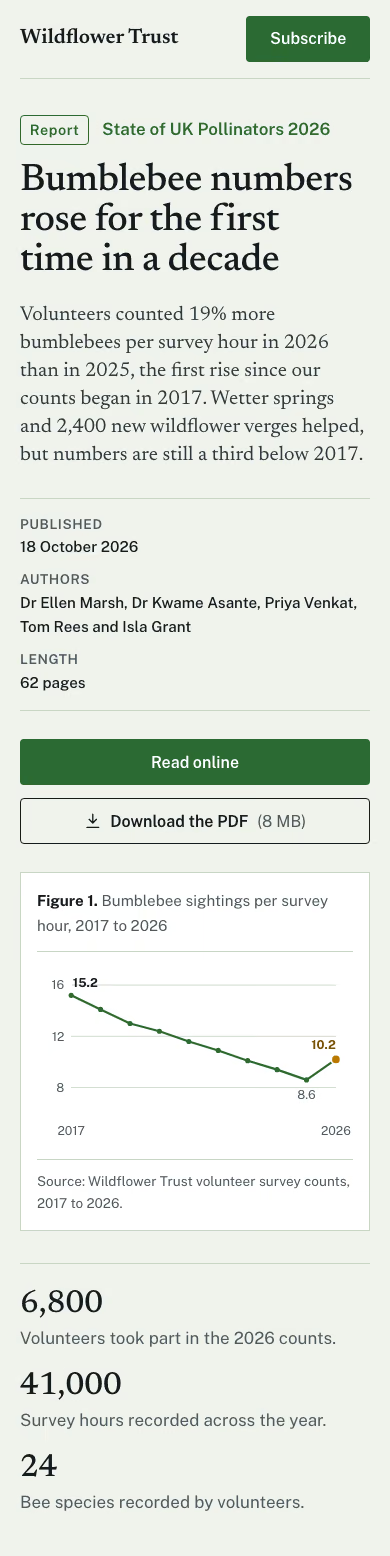
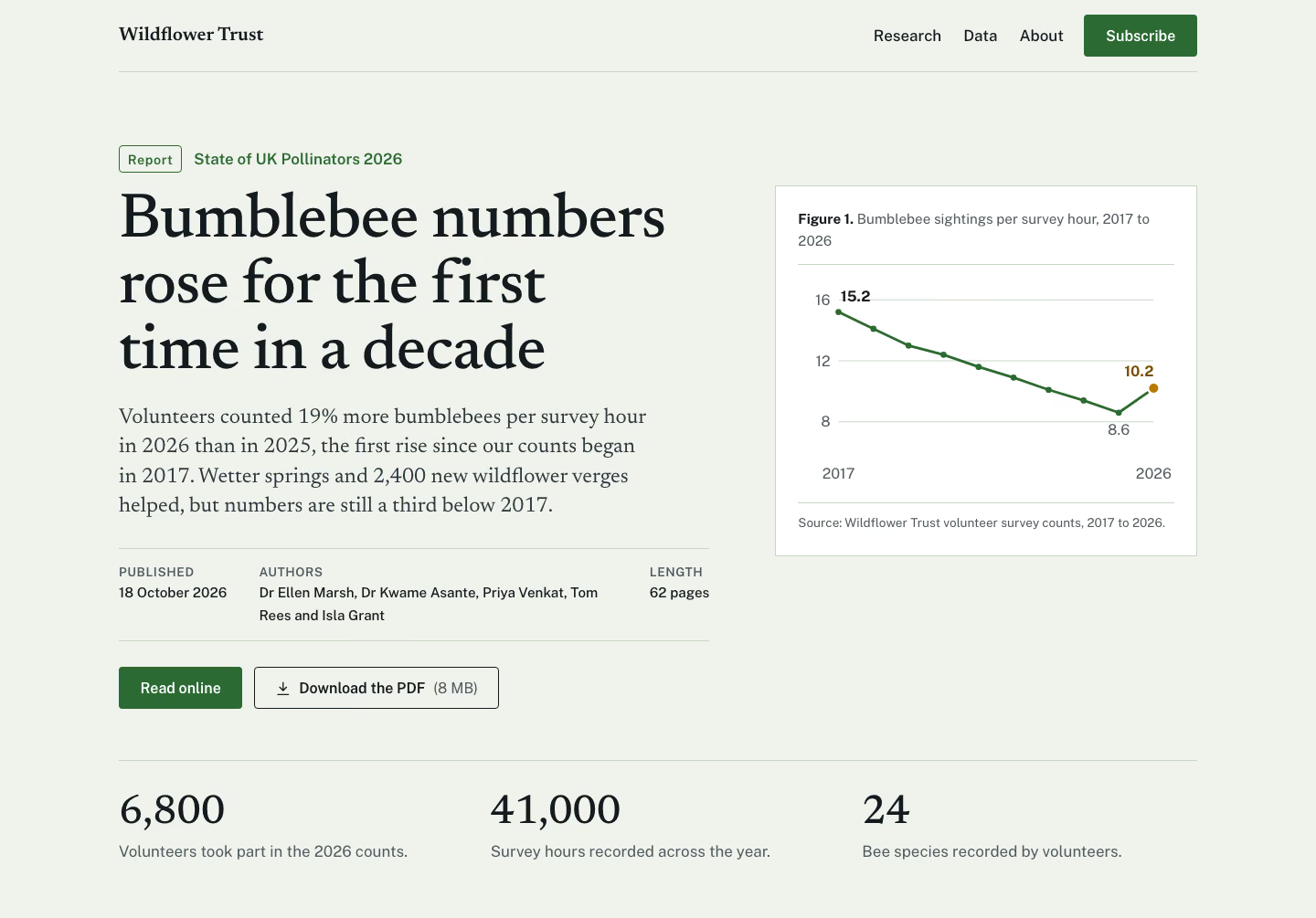
The top of the report page is built. The check passes at 390, 768 and 1440 px. That covers sideways overflow, text size, contrast, focus styles, reduced motion, leftover sample words and emoji icons. I read the 1440 and 390 screenshots myself and found nothing cut off or overlapping. I didn't open the 768 one.

Files (in the work folder):

  • index.html
  • style.css
  • script.js
  • check/390.png, check/768.png and check/1440.png
Show more

What it did in run 1

  1. research-report-hero
  2. ./brief.md
  3. cd .; ls -la; S=.claude/skills/research-report-hero; ls $S/reference; cat $S/reference/index.html $S/reference/style.css $S/reference/script.js; node $S/scripts/check.mjs --ready
  4. ls -la && ls .claude/skills/research-report-hero/reference && cat .claude/skills/research-report-hero/reference/index.html .claude/skills/research-report-hero/reference/style.css .claude/skills/research-report-hero/reference/script.js && node .claude/skills/research-report-hero/scripts/check.mjs --ready
  5. cp .claude/skills/research-report-hero/reference/style.css style.css && cp .claude/skills/research-report-hero/reference/script.js script.js && python3 - <<'E' import re d=[15.2,14.1,13.0,12.4,11.6,10.9,10.1,9.4,8.6,10.2] yrs=list(range(2017,2027)) x0,x1,y0,y1=40,350,20,170 # plot area def X(i):return x0+(x1-x0)*i/9 def Y(v):return y1-(y1-y0)*(v-6)/(16-6) # axis 6..16 pts=[(X(i),Y(v)) for i,v in enumerate(d)] path="M"+" L".join(f"{x:.1f} {y:.1f}" for x,y in pts) grid="".join(f'<line x1="{x0}" x2="{x1}" y1="{Y(v):.1f}" y2="{Y(v):.1f}" class="g"/><text x="{x0-8}" y="{Y(v)+5:.1f}" text-anchor="end">{v}</text>' for v in (8,12,16)) xl="".join(f'<text x="{X(i):.1f}" y="195" text-anchor="middle">{yrs[i]}</text>' for i in (0,9)) lab=f'<text x="{pts[0][0]+2:.1f}" y="{pts[0][1]-10:.1f}" class="v">15.2</text><text x="{pts[8][0]:.1f}" y="{pts[8][1]+22:.1f}" text-anchor="middle">8.6</text><text x="{pts[9][0]:.1f}" y="{pts[9][1]-12:.1f}" text-anchor="end" class="v hl">10.2</text>' dots="".join(f'<circle cx="{x:.1f}" cy="{y:.1f}" r="{5.5 if i==9 else 3}" class="{"dh" if i==9 else "dt"}"/>' for i,(x,y) in enumerate(pts)) label="Bumblebee sightings per survey hour, 2017 to 2026: "+", ".join(f"{y} {v}" for y,v in zip(yrs,d))+"." svg=f'<svg viewBox="0 0 370 205" role="img" aria-label="{label}" focusable="false">{grid}{xl}<path d="{path}" pathLength="1" class="ln"/>{dots}{lab}</svg>' html=f'''<!doctype html> <html lang="en"> <head> <meta charset="utf-8"> <meta name="viewport" content="width=device-width, initial-scale=1"> <title>Bumblebee numbers rose for the first time in a decade | State of UK Pollinators 2026</title> <meta name="description" content="Volunteers counted 19% more bumblebees per survey hour in 2026 than in 2025, the first rise since counts began in 2017. Wildflower Trust, State of UK Pollinators 2026."> <meta property="og:title" content="Bumblebee numbers rose for the first time in a decade"> <meta property="og:description" content="Volunteers counted 19% more bumblebees per survey hour in 2026 than in 2025. Numbers are still a third below 2017."> <meta property="og:type" content="article"> <link rel="preconnect" href="https://fonts.googleapis.com"> <link rel="preconnect" href="https://fonts.gstatic.com" crossorigin> <link rel="stylesheet" href="https://fonts.googleapis.com/css2?family=Newsreader:ital,wght@0,400;0,500;0,600;1,400&family=Public+Sans:wght@400;500;600;700&display=swap"> <link rel="stylesheet" href="style.css"> </head> <body> <a class="skip" href="#main">Skip to content</a> <div class="hero rr"><header class="hbar wrap"><a class="brand" href="/">Wildflower Trust</a><nav aria-label="Main"><ul><li><a href="/research">Research</a></li><li><a href="/data">Data</a></li><li><a href="/about">About</a></li></ul></nav><a class="btn btn-primary" href="/subscribe">Subscribe</a></header><main id="main"><div class="wrap rr-in"><div class="rr-copy"><p class="rr-kick"><span>Report</span>State of UK Pollinators 2026</p><h1>Bumblebee numbers rose for the first time in a decade</h1><p class="rr-stand">Volunteers counted 19% more bumblebees per survey hour in 2026 than in 2025, the first rise since our counts began in 2017. Wetter springs and 2,400 new wildflower verges helped, but numbers are still a third below 2017.</p><dl class="rr-meta"><div><dt>Published</dt><dd><time datetime="2026-10-18">18 October 2026</time></dd></div><div><dt>Authors</dt><dd>Dr Ellen Marsh, Dr Kwame Asante, Priya Venkat, Tom Rees and Isla Grant</dd></div><div><dt>Length</dt><dd>62 pages</dd></div></dl><div class="h-acts"><a class="btn btn-primary" href="/report">Read online</a><a class="btn btn-ghost" href="/state-of-uk-pollinators-2026.pdf" download><svg class="ic" width="18" height="18" viewBox="0 0 24 24" fill="none" stroke="currentColor" stroke-width="1.8" stroke-linecap="round" stroke-linejoin="round" aria-hidden="true" focusable="false"><path d="M12 3v12M7 10l5 5 5-5M4 21h16"/></svg>Download the PDF <span class="rr-size">(8 MB)</span></a></div></div> <figure class="rr-fig"><figcaption><b>Figure 1.</b> Bumblebee sightings per survey hour, 2017 to 2026</figcaption><div class="rr-chart">{svg}</div><p class="rr-src">Source: Wildflower Trust volunteer survey counts, 2017 to 2026.</p></figure></div> <div class="wrap rr-find"><h2 class="sr-only">Key findings</h2><ol><li><b>6,800</b><span>Volunteers took part in the 2026 counts.</span></li><li><b>41,000</b><span>Survey hours recorded across the year.</span></li><li><b>24</b><span>Bee species recorded by volunteers.</span></li></ol></div></main></div> <script src="script.js" defer></script> </body> </html> ''' open('index.html','w').write(html) c=open('style.css').read() c=c.replace("--bg:#EEF2F0","--bg:#EFF3EC").replace("--line:#C9D3D0","--line:#CBD5C6").replace("--accent:#0D5966","--accent:#2B6A33").replace("--em:#0D5966","--em:#2B6A33").replace("--bar2:#9DB8BC","--bar2:#9DB8A0;--honey:#B97A00;--accent-hover:#1F5226") # replace bar chart css c=re.sub(r"\.rr-chart ul\{.*?\.hl \.rl,\.hl \.rv\{[^}]*\}\n","",c,flags=re.S) c=c.replace("@keyframes rrgrow{from{transform:scaleX(0)}}",""".rr-chart{padding-block:1rem} .rr-chart svg{width:100%;height:auto;overflow:visible} .rr-chart text{font-family:var(--font-body);font-size:14.5px;fill:var(--muted)} .rr-chart .v{font-weight:700;fill:var(--ink)} .rr-chart .v.hl{fill:#7A4F00} .rr-chart .g{stroke:var(--line);stroke-width:1} .rr-chart .ln{fill:none;stroke:var(--accent);stroke-width:2.5;stroke-linejoin:round;stroke-linecap:round;stroke-dasharray:1;animation:rrdraw 1.2s ease both} .rr-chart .dt{fill:var(--accent)} .rr-chart .dh{fill:var(--honey);stroke:var(--surface);stroke-width:2} @keyframes rrdraw{from{stroke-dashoffset:1}to{stroke-dashoffset:0}}""") c=c.replace(".rr-meta{display:grid;grid-template-columns:auto 1fr auto",".rr-meta{display:grid;grid-template-columns:auto minmax(0,1fr) auto") open('style.css','w').write(c) E grep -c "rrgrow" style.css; node .claude/skills/research-report-hero/scripts/check.mjs index.html --out check 2>&1 | tail -30
  6. /tmp/rr-build/build.py
  7. /tmp/rr-build/template.html
  8. W=.; python3 -I /tmp/rr-build/build.py $W && cd $W && node .claude/skills/research-report-hero/scripts/check.mjs index.html --out check 2>&1 | tail -30
  9. python3 -I /tmp/rr-build/build.py .
  10. node .claude/skills/research-report-hero/scripts/check.mjs index.html --out check 2>&1 | tail -30
  11. ./check/1440.png
  12. ./check/390.png
  13. Done

12 Nov 2026 · Claude Code 2.1.322 with Claude Sonnet 5.5 · 1 min 12 s · $0.24 of API use

Questions

Is Research Report Hero free?

No. Research Report Hero costs $9.99 once and stays in your Recaply account, or it comes with the Recaply plan ($19.99 a month), which opens every premium skill and prompt.

Which agents can use Research Report Hero?

Claude Code, Codex, Cursor, Gemini CLI, GitHub Copilot and OpenCode.

What do I get when I buy Research Report Hero?

A ZIP of the whole skill folder (32 KB): the SKILL.md your agent follows and its 6 other files, the references, templates and scripts it uses. You download it from this page whenever you need it, and install it in Claude Code, Codex, Cursor, Gemini CLI, GitHub Copilot and OpenCode. The Recaply plan opens it too, with every other premium skill and prompt.

How do I install Research Report Hero?

Buy it, then download the ZIP from this page. For Claude Code, unzip it into .claude/skills/ in your project. For Codex, Cursor and Gemini CLI, unzip it and run npx skills add ./research-report-hero with your agent's flag.

What do I get from Research Report Hero?

One HTML file with its CSS inside: no build step, no framework. An editorial hero for a research report or white paper. Checked at phone and desktop widths.

What does Research Report Hero need?

Node 20+ and Chrome, and no API key. Each use costs nothing beyond your agent.

How big is Research Report Hero?

7 files, about 20,755 tokens in all. The SKILL.md is about 2,261 tokens, and your agent reads it only when the job fits.

What does a run cost?

Our 1 runs took 1 min 12 s to 1 min 12 s and $0.24 to $0.24 of API use each, in Claude Code with claude-sonnet-5-5. On a Claude plan, a run counts toward your usage instead.

Do I have to name Research Report Hero to use it?

Type /research-report-hero first to make sure it loads. Without it, Claude Code may judge a small job simple enough to do without the skill.