 Video
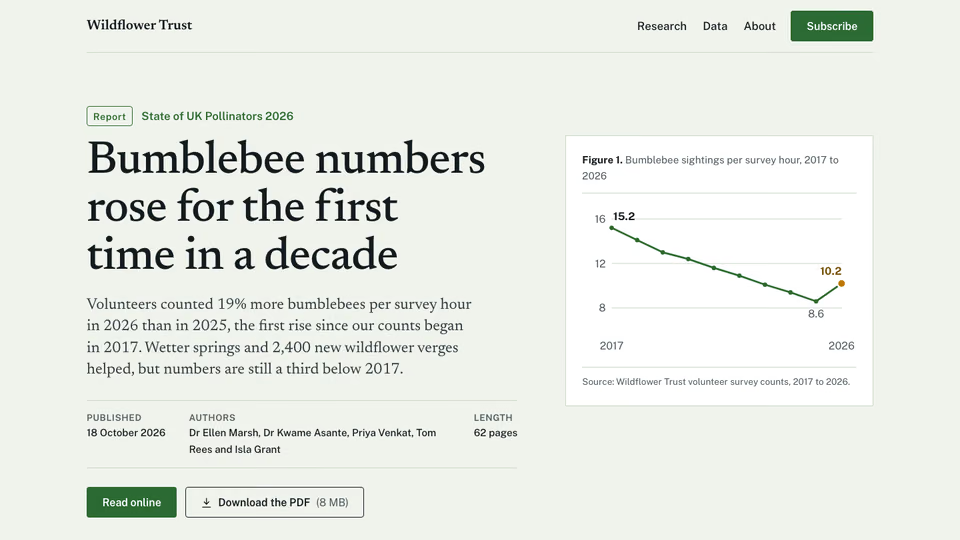
Research Report Hero


 Editorial hero for a report
 Claude CodeCodexCursor
 Gemini CLI
 GitHub Copilot
 OpenCode
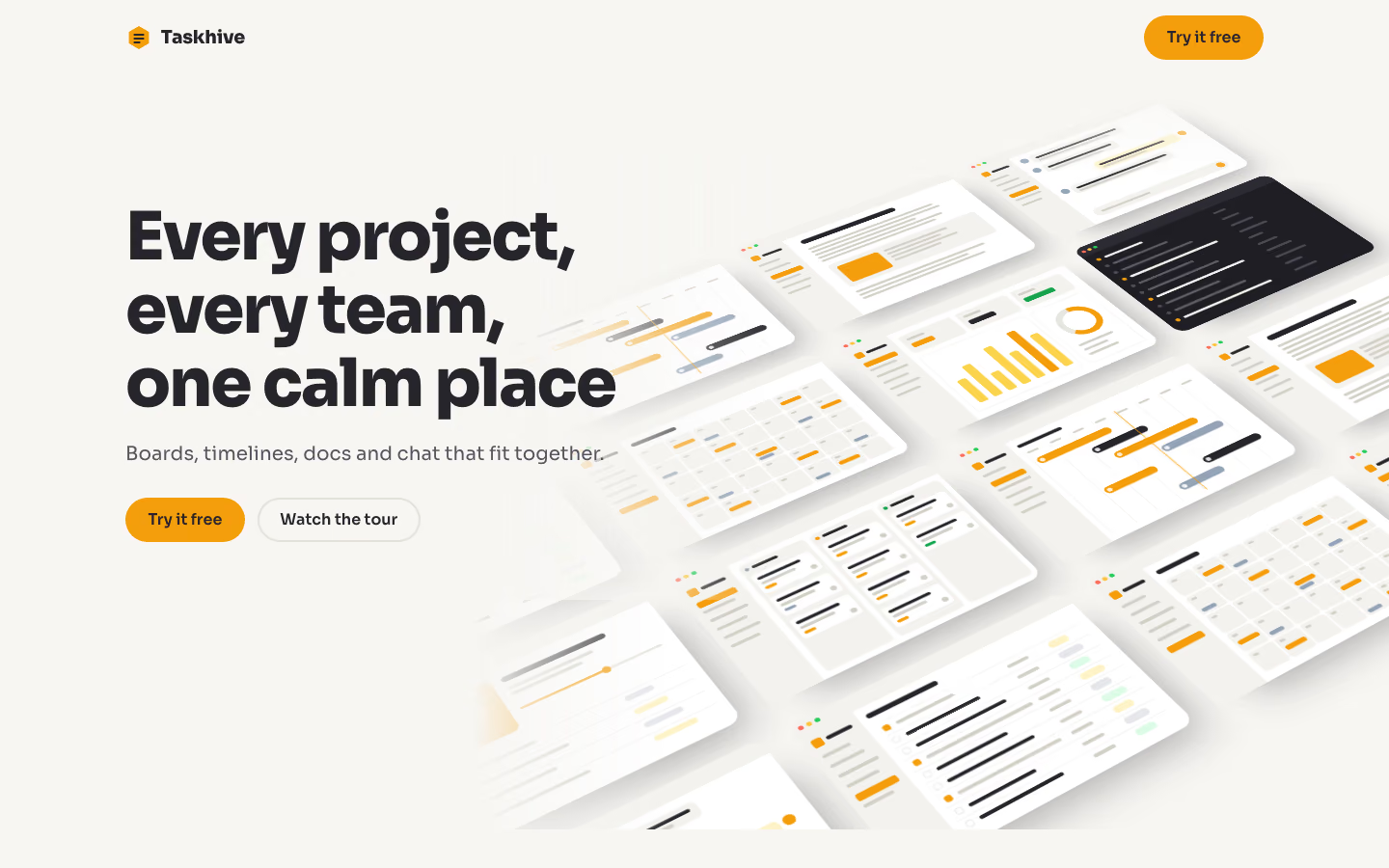
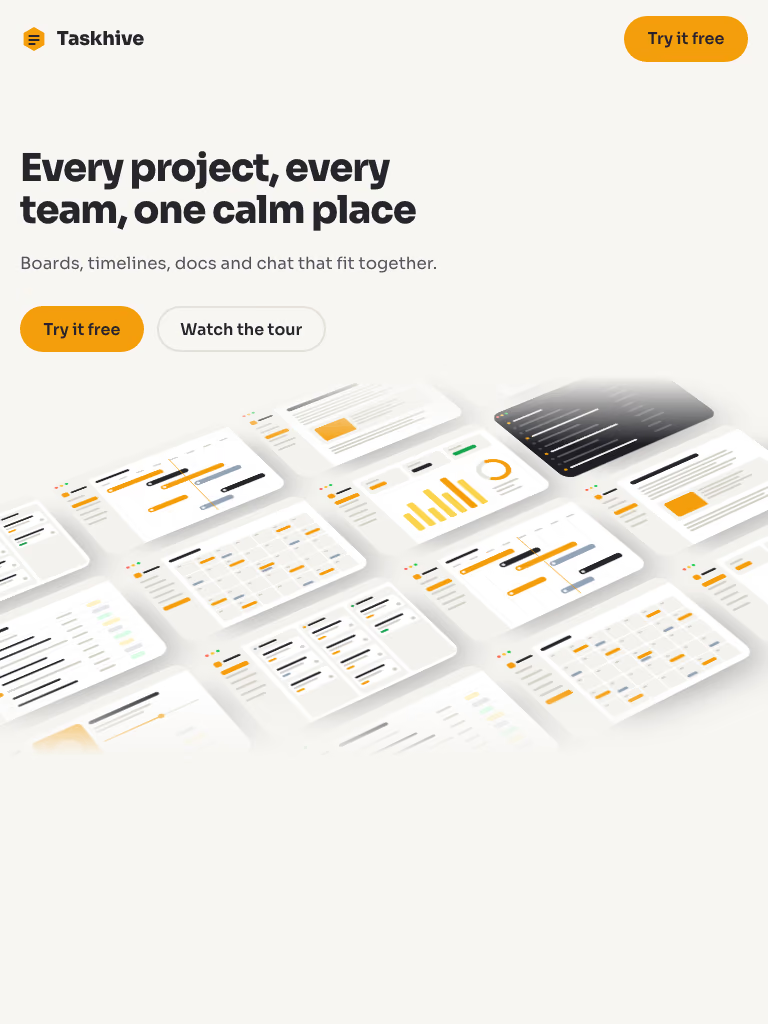
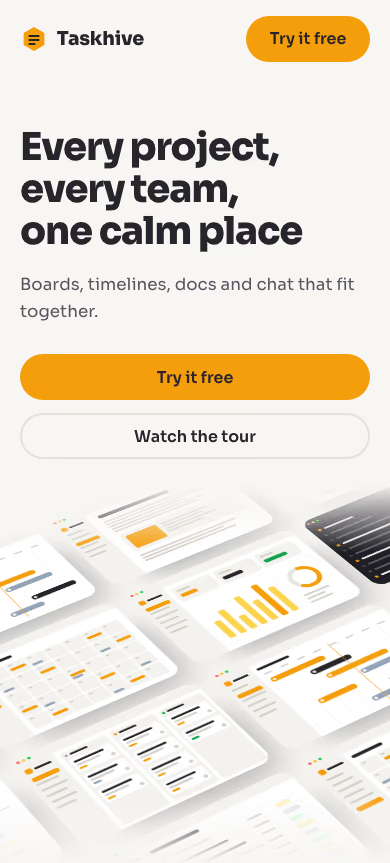
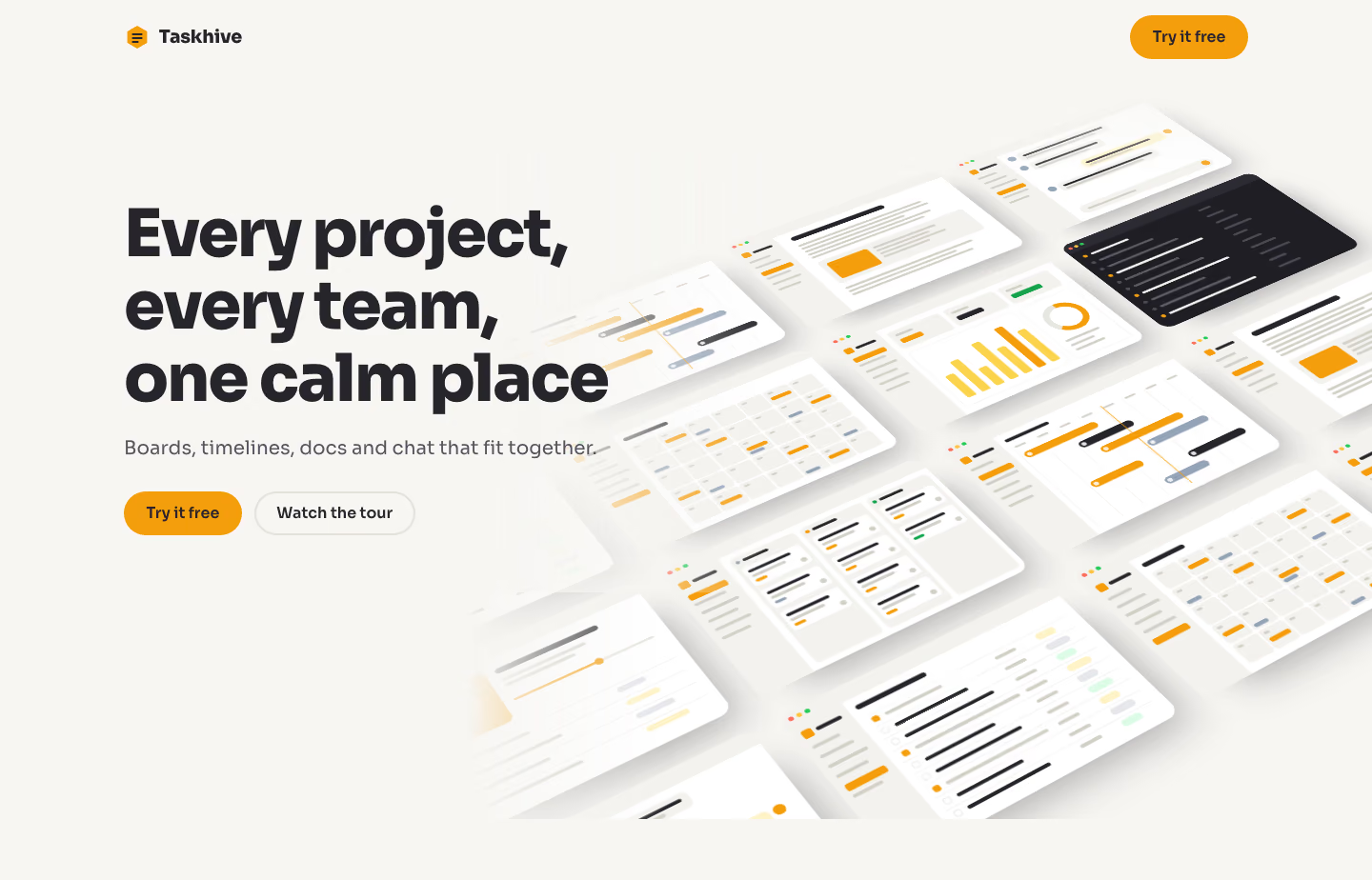
A hero with a tilted 3D wall of product screens rising behind the copy, like a gallery seen from an angle.
$9.99once, yours to keep
Payments are non-refundable. See our Terms of service.
Yours. Download it, then add it to your agent.
Builds a hero with an angled, perspective gallery of screens into your own project: off-white hero; copy on the left; on the right and behind, a wall of sixteen rounded app screens in a 4 by 4 grid, turned and tipped back in 3D so they recede into the corner; the wall rises into place on load and straightens slightly as you scroll. Plain HTML, CSS and JavaScript, or matched to React, Next.js, Vue, Svelte, Astro or Tailwind when the project uses them. Comes with a working reference and a check that screenshots it at phone, tablet and desktop widths and flags sideways overflow, text under 12px, missing alt text and names, low contrast, no focus styles, motion that ignores reduced motion, leftover sample words and emoji icons. Use when a template marketplace, design tool, website builder or app with many screens wants an impressive showcase hero, or someone asks for a tilted, isometric or 3D gallery hero.
By RecaplyUpdated 12 Nov
Video
Editorial hero for a report
 Video1 view, 0 downloads
Lavender page for an AI app
 Video
Product page for headphones
 Video
Page with a node-flow hero
You say
Hero with a tilted 3D wall of our app screenshots for our project management app. Copy in brief.md.
It said back
The Taskhive hero is built and passes the check, but the wall shows drawn stand-ins, not your screenshots. The brief says you have 9 screenshots, but none were in the folder.
Files (in the working folder):
index.html: the page, with your headline, the line "Boards, timelines, docs and chat that fit together." and the buttons "Try it free" and "Watch the tour".style.css: the layout, with honey yellow #F59E0B and charcoal #26252B as the brand colours.script.js: makes the wall rise into place on load and straighten a little as you scroll. With reduced motion on, it just sits there.What it did in run 1
<rect width="640" height="420" rx="14" fill="${dark?'#1F1E24':W}"/><path d="M0 14a14 14 0 0 1 14-14h612a14 14 0 0 1 14 14v26H0z" fill="${dark?'#2C2B33':G}"/><circle cx="20" cy="20" r="5.5" fill="#FF6B5E"/><circle cx="38" cy="20" r="5.5" fill="#FFC23D"/><circle cx="56" cy="20" r="5.5" fill="#2ACB55"/>; const side=(i)=>{let s=<rect x="0" y="40" width="120" height="380" fill="${G}"/><rect x="16" y="58" width="22" height="22" rx="6" fill="${H}"/><rect x="46" y="64" width="56" height="9" rx="4" fill="${C}"/>; for(let k=0;k<6;k++)s+=<rect x="16" y="${100+k*28}" width="${k===i?88:60+(k*13)%30}" height="${k===i?18:8}" rx="${k===i?6:4}" fill="${k===i?H:M}" ${k===i?'opacity=".9"':''}/>;return s;}; const bar=(x,y,w,c=M,h=8)=><rect x="${x}" y="${y}" width="${w}" height="${h}" rx="${h/2}" fill="${c}"/>; const card=(x,y,w,tag)=><rect x="${x}" y="${y}" width="${w}" height="64" rx="8" fill="${W}" stroke="${L}"/>${bar(x+10,y+12,w-40,C)}${bar(x+10,y+28,w-60)}<rect x="${x+10}" y="${y+44}" width="26" height="8" rx="4" fill="${tag}"/><circle cx="${x+w-16}" cy="${y+48}" r="7" fill="${M}"/>; const board=(v)=>{let s=chrome()+side(0);const cols=[['#94A3B8',3],[H,v?2:3],['#16A34A',2]]; cols.forEach(([c,n],i)=>{const x=136+i*168;s+=<rect x="${x}" y="56" width="156" height="350" rx="10" fill="${G}"/><circle cx="${x+14}" cy="72" r="5" fill="${c}"/>${bar(x+26,68,60,C)};for(let k=0;k<n+ (i===1&&!v?1:0);k++)s+=card(x+8,92+k*76,140,k%2?c:H);});return s;}; const timeline=()=>{let s=chrome()+side(1);s+=bar(136,60,120,C,10);for(let i=0;i<8;i++)s+=<rect x="${136+i*62}" y="84" width="1" height="320" fill="${L}"/>${bar(142+i*62,90,30,M,6)}; [[0,0,200,H],[1,120,150,C],[2,150,230,H],[3,250,170,'#94A3B8'],[4,60,140,H],[5,300,160,C],[6,200,120,'#94A3B8']].forEach(([r,x,w,c])=>{const y=118+r*40;s+=bar(136,y+4,0)+<rect x="${144+x}" y="${y}" width="${w}" height="22" rx="11" fill="${c}" opacity=".92"/><circle cx="${156+x}" cy="${y+11}" r="6" fill="${W}" opacity=".85"/>;}); return s+<rect x="388" y="84" width="2" height="320" fill="${H}"/>;}; const doc=(v)=>{let s=chrome()+side(2)+bar(156,64,280,C,18);[372,384,300,370,340].forEach((w,i)=>s+=bar(156,104+i*16,w)); s+=<rect x="156" y="196" width="440" height="110" rx="10" fill="${G}"/><rect x="172" y="212" width="120" height="78" rx="8" fill="${v?C:H}"/>;[190,160,200,140].forEach((w,i)=>s+=bar(308,216+i*16,w)); [380,320,360].forEach((w,i)=>s+=bar(156,326+i*16,w));return s+<rect x="500" y="62" width="76" height="24" rx="12" fill="${H}" opacity=".25"/>;}; const chat=()=>{let s=chrome()+side(3);const m=(x,y,w,me)=><circle cx="${x}" cy="${y+12}" r="12" fill="${me?H:'#94A3B8'}"/><rect x="${x+20}" y="${y}" width="${w}" height="40" rx="12" fill="${me?'#FEF3C7':G}"/>${bar(x+34,y+12,w-30,C)}${bar(x+34,y+26,w-70)}; s+=m(150,60,300,0)+m(150,116,240,0)+<circle cx="590" cy="194" r="12" fill="${H}"/><rect x="290" y="182" width="280" height="40" rx="12" fill="#FEF3C7"/>${bar(304,194,220,C)}${bar(304,208,150)}+m(150,240,330,0); return s+<rect x="150" y="360" width="440" height="36" rx="18" fill="${G}" stroke="${L}"/>${bar(170,375,160)}<circle cx="570" cy="378" r="12" fill="${H}"/>;}; const list=()=>{let s=chrome()+side(4)+bar(136,60,160,C,12);for(let i=0;i<9;i++){const y=92+i*34;s+=<rect x="136" y="${y}" width="480" height="1" fill="${L}"/><rect x="146" y="${y+10}" width="14" height="14" rx="4" fill="${i%3===0?H:W}" stroke="${i%3===0?H:M}"/>+bar(174,y+13,130+(i*37)%120,i%3===0?M:C)+bar(430,y+13,50)+<rect x="530" y="${y+8}" width="${46+(i%2)*10}" height="18" rx="9" fill="${[ '#FEF3C7','#E5E7EB','#DCFCE7'][i%3]}"/>;}return s;}; const cal=()=>{let s=chrome()+side(5)+bar(136,60,110,C,12);for(let r=0;r<5;r++)for(let c=0;c<7;c++){const x=136+c*68,y=92+r*62;s+=<rect x="${x}" y="${y}" width="64" height="58" rx="8" fill="${G}"/>+bar(x+8,y+8,14,M,6);if((r*7+c)%4===1)s+=<rect x="${x+6}" y="${y+26}" width="52" height="12" rx="6" fill="${(r+c)%2?H:C}"/>;if((r*7+c)%5===2)s+=<rect x="${x+6}" y="${y+42}" width="36" height="10" rx="5" fill="#94A3B8"/>;}return s;}; const dash=()=>{let s=chrome()+side(0);[['Open',H],['Due soon',C],['Done','#16A34A']].forEach(([_,c],i)=>{const x=136+i*162;s+=<rect x="${x}" y="60" width="150" height="76" rx="10" fill="${G}"/>+bar(x+14,76,50)+<rect x="${x+14}" y="98" width="${60+i*14}" height="18" rx="6" fill="${c}"/>;}); s+=<rect x="136" y="154" width="300" height="240" rx="12" fill="none" stroke="${L}"/>;[0.5,0.7,0.4,0.85,0.6,0.95,0.75].forEach((v,i)=>s+=<rect x="${158+i*40}" y="${370-v*190}" width="24" height="${v*190}" rx="6" fill="${i===5?H:'#FCD34D'}"/>); s+=<rect x="452" y="154" width="164" height="240" rx="12" fill="none" stroke="${L}"/><circle cx="534" cy="244" r="48" fill="none" stroke="${L}" stroke-width="16"/><circle cx="534" cy="244" r="48" fill="none" stroke="${H}" stroke-width="16" stroke-dasharray="190 302" transform="rotate(-90 534 244)"/>+bar(472,320,100)+bar(472,340,70)+bar(472,360,86);return s;}; const inbox=()=>{let s=chrome(1);for(let i=0;i<10;i++){const y=60+i*34;s+=<circle cx="30" cy="${y+8}" r="6" fill="${i%3===0?H:'#4B4A55'}"/>+bar(48,y+4,120+(i*53)%160,i%3===0?'#F4F3EE':'#5C5B66')+bar(400,y+4,40+(i*17)%60,'#4B4A55');}return s+<rect x="24" y="392" width="10" height="14" fill="${H}"/>;}; const goals=()=>{let s=chrome()+side(1)+<rect x="136" y="60" width="150" height="150" rx="14" fill="${H}"/><circle cx="211" cy="135" r="38" fill="${W}" opacity=".35"/>+bar(306,70,220,C,14)+bar(306,100,180)+bar(306,116,150)+<rect x="306" y="160" width="300" height="6" rx="3" fill="${L}"/><rect x="306" y="160" width="180" height="6" rx="3" fill="${H}"/><circle cx="486" cy="163" r="9" fill="${H}"/>; for(let i=0;i<4;i++){const y=236+i*40;s+=<rect x="136" y="${y}" width="480" height="1" fill="${L}"/>+bar(146,y+14,150+(i*47)%90)+<rect x="480" y="${y+10}" width="${60+i*10}" height="${14}" rx="7" fill="${i%2?'#FEF3C7':'#E5E7EB'}"/>;}return s;}; const shots=[board(0),timeline(),doc(0),chat(),list(),cal(),dash(),inbox(),goals()]; const names=['Board view with task cards in three columns','Project timeline with bars across eight weeks','Doc with a heading, text and an inline image','Team chat thread','Task list with statuses','Calendar of due dates','Dashboard with progress charts','Dark inbox of updates','Goal page with progress bar and task list']; const syms=shots.map((s,i)=><symbol id="s${i}" viewBox="0 0 640 420">${s}</symbol>).join(''); let tiles='';for(let i=0;i<16;i++){tiles+=<span class="ag-s"><svg viewBox="0 0 640 420" focusable="false"><use href="#s${i%9}"/></svg></span>;} const html=<!doctype html> <html lang="en"> <head> <meta charset="utf-8"> <meta name="viewport" content="width=device-width, initial-scale=1"> <title>Taskhive – Every project, every team, one calm place</title> <meta name="description" content="Taskhive brings boards, timelines, docs and chat together so every project and team has one calm place to work."> <link rel="preconnect" href="https://fonts.googleapis.com"> <link rel="preconnect" href="https://fonts.gstatic.com" crossorigin> <link rel="stylesheet" href="https://fonts.googleapis.com/css2?family=Sora:wght@400;600;700;800&display=swap"> <link rel="stylesheet" href="style.css"> </head> <body> <a class="skip" href="#main">Skip to content</a> <svg width="0" height="0" style="position:absolute" aria-hidden="true" focusable="false"><defs>${syms}</defs></svg> <div class="hero ag"> <header class="hbar wrap"> <a class="brand" href="#main"><svg viewBox="0 0 28 28" aria-hidden="true" focusable="false"><path d="M14 2l10.4 6v12L14 26 3.6 20V8z" fill="#F59E0B"/><path d="M9.5 11h9M9.5 15h9M9.5 19h5" stroke="#26252B" stroke-width="2.2" stroke-linecap="round"/></svg>Taskhive</a> <a class="btn btn-primary" href="#try">Try it free</a> </header> <main id="main"> <!-- Decorative stand-ins. Swap each .ag-s for an <img src="screens/NN.png" alt=""> of the real screenshots (9 supplied, cycled to fill 16). --> <div class="ag-wall" aria-hidden="true"><div class="ag-grid">${tiles}</div></div> <div class="wrap ag-in"> <div class="ag-copy"> <h1>Every project, every team, one calm place</h1> <p class="h-lede">Boards, timelines, docs and chat that fit together.</p> <div class="h-acts"><a class="btn btn-primary" href="#try">Try it free</a><a class="btn btn-ghost" href="#tour">Watch the tour</a></div> </div> </div> </main> </div> <script src="script.js" defer></script> </body> </html> ; fs.writeFileSync(out+'/index.html',html); EOF cd . && node /tmp/gen/gen.mjs . && R=.claude/skills/tilted-screens-hero/reference && cp $R/style.css style.css && cat > script.js <<'EOF' // The wall's tilt eases a little flatter as you scroll (skipped with reduced motion). const reduceMotion = window.matchMedia('(prefers-reduced-motion: reduce)'); const grid = document.querySelector('.ag-grid'); const ease = () => { if (reduceMotion.matches) { grid.style.setProperty('--ease', '0'); return; } grid.style.setProperty('--ease', String(Math.min(1, window.scrollY / 600))); }; addEventListener('scroll', ease, { passive: true }); reduceMotion.addEventListener?.('change', ease); ease(); EOF python3 - <<'EOF' import re p='style.css';s=open(p).read() s=s.replace("--accent:#6D28D9;--on-accent:#FFFFFF;--em:#6D28D9;","--accent:#F59E0B;--accent-hover:#D97706;--on-accent:#26252B;--em:#92400E;--focus:#26252B;") s=s.replace("--ink:#18171C;--muted:#55535E","--ink:#26252B;--muted:#55535E") s=s.replace(".hbar .brand svg{width:28px;height:28px}",".hbar .brand svg{width:28px;height:28px;display:inline-block}") s=s.replace("rgba(24,23,28,.35)","rgba(38,37,43,.35)") open(p,'w').write(s) EOF node .claude/skills/tilted-screens-hero/scripts/check.mjs index.html --out check 2>&1 | tail -30No. Tilted Screens Hero costs $9.99 once and stays in your Recaply account, or it comes with the Recaply plan ($19.99 a month), which opens every premium skill and prompt.
Claude Code, Codex, Cursor, Gemini CLI, GitHub Copilot and OpenCode.
A ZIP of the whole skill folder (37 KB): the SKILL.md your agent follows and its 6 other files, the references, templates and scripts it uses. You download it from this page whenever you need it, and install it in Claude Code, Codex, Cursor, Gemini CLI, GitHub Copilot and OpenCode. The Recaply plan opens it too, with every other premium skill and prompt.
Buy it, then download the ZIP from this page. For Claude Code, unzip it into .claude/skills/ in your project. For Codex, Cursor and Gemini CLI, unzip it and run npx skills add ./tilted-screens-hero with your agent's flag.
One HTML file with its CSS inside: no build step, no framework. A hero with an angled, perspective gallery of screens. Checked at phone and desktop widths.
Node 20+ and Chrome, and no API key. Each use costs nothing beyond your agent.
7 files, about 30,114 tokens in all. The SKILL.md is about 2,178 tokens, and your agent reads it only when the job fits.
Our 1 runs took 2 min 23 s to 2 min 23 s and $0.48 to $0.48 of API use each, in Claude Code with claude-sonnet-5-5. On a Claude plan, a run counts toward your usage instead.
Type /tilted-screens-hero first to make sure it loads. Without it, Claude Code may judge a small job simple enough to do without the skill.