Skip to content

DirectorySkills

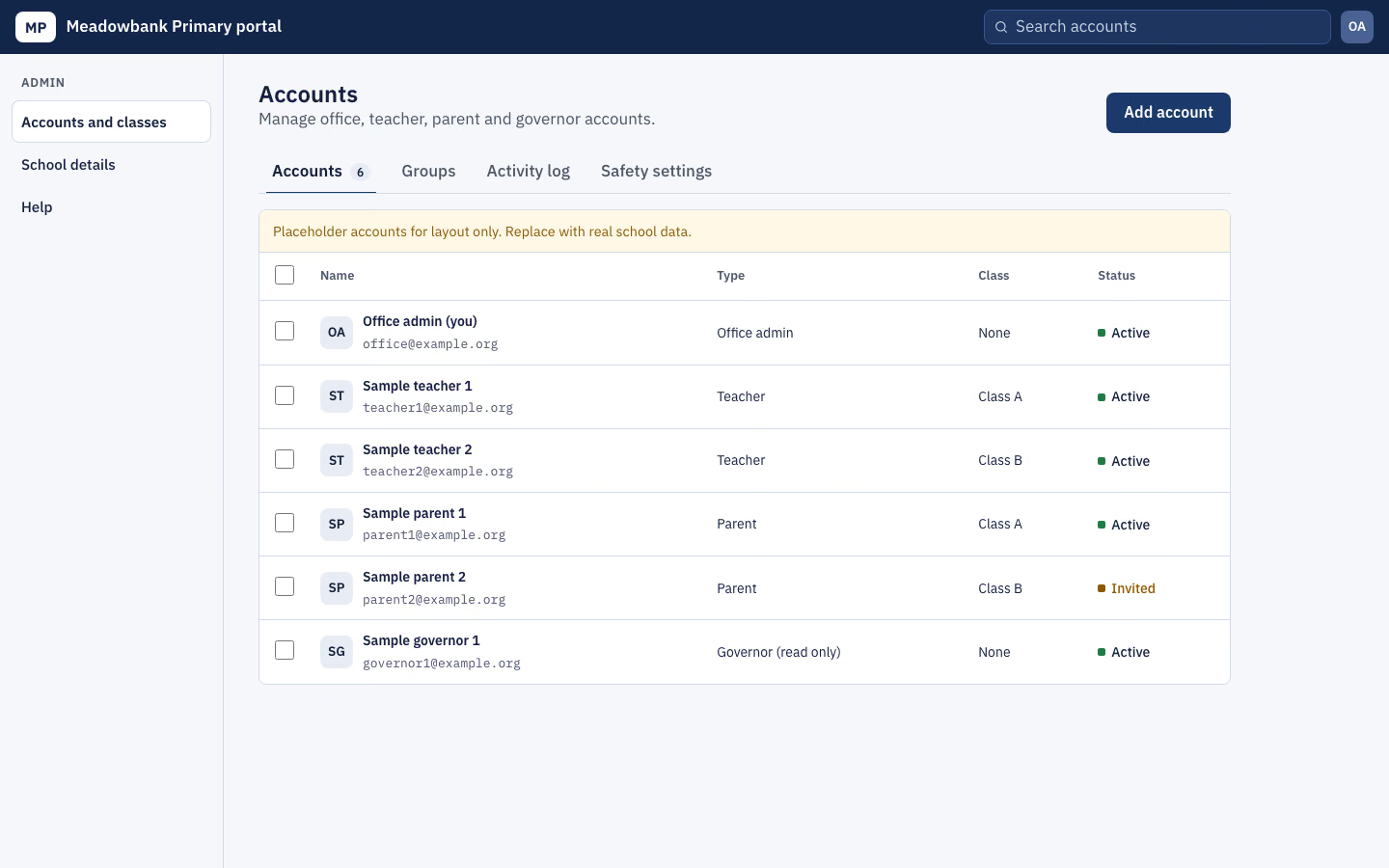
Team access console: 1440, made in this run
Run 1Team access console“Build the admin settings area where school office staff manage teacher and parent accounts. Details in brief.md.”
Runs in
  • Claude Code
  • Codex
  • Cursor
  • Gemini CLI
  • GitHub Copilot
  • OpenCode
Generates with
Your agent's model
Tested with
Claude Code 2.1.322Claude Sonnet 5.51 real run, 10 Nov
Needs
Node 20+Chrome
Licence
Recaply licence

Team Access Console

A slate-grey admin console for people and access: tabs for members, roles, audit log and settings, bulk actions and an invite dialog.

$9.99once, yours to keep

Builds an admin console for members, roles and settings into your own project: a monochrome slate screen: dark top bar with workspace switcher and search; a settings sidebar; tabs for Members, Roles, Audit log and Security; a members table with checkboxes and a bulk bar; a roles matrix; a monospace audit log; security switches; an invite dialog. Plain HTML, CSS and JavaScript, or matched to React, Next.js, Vue, Svelte, Astro or Tailwind when the project uses them. Comes with a working reference and a check that screenshots it at phone, tablet and desktop widths and flags sideways overflow, text under 12px, missing alt text and names, low contrast, no focus styles, motion that ignores reduced motion, leftover sample words and emoji icons. Use when a B2B app, internal tool or workspace product needs the admin area where owners manage people, roles, security settings and the audit log, or someone asks for an admin console, user management screen, settings or team admin page.

By RecaplyUpdated 12 Nov

Install Team Access Console

After the download, ask your agent to add it, or run the line yourself.

Read https://recaply.co/skills/team-access-console/install.md and follow it to install the team-access-console skill from team-access-console.zip.

Paste it into your agent. It reads our install steps, finds the ZIP you downloaded and adds the skill for you.

New to skills? How to install a skill

Similar skills

All 735 skills

Who Team Access Console is for

What you get

  • One HTML file with its CSS inside: no build step, no framework
  • An admin console for members, roles and settings
  • Checked at phone and desktop widths

Good fit

  • The admin area of a B2B app or internal tool
  • Managing people, roles and invites
  • Security settings and the audit log

Not for

  • An app with a backend, sign-in or a database
  • Copying another company's site

About this skill

You say

Build the admin settings area where school office staff manage teacher and parent accounts. Details in brief.md.

It said back

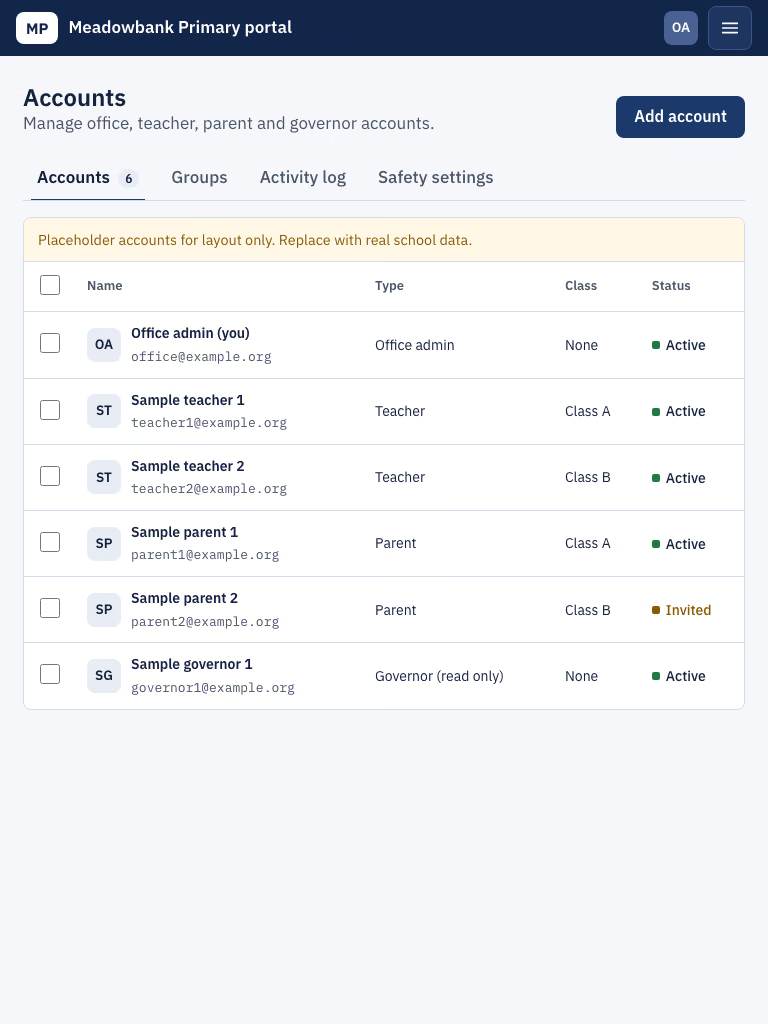
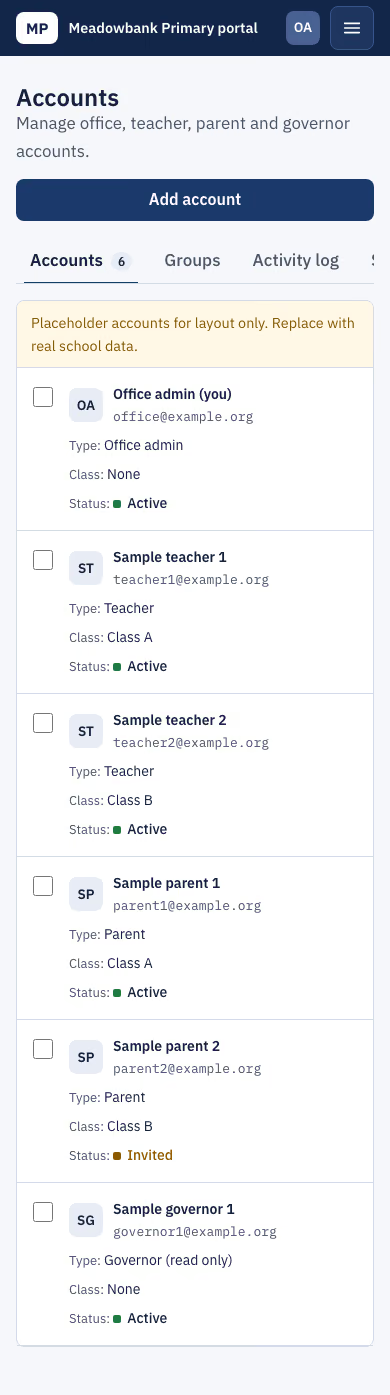
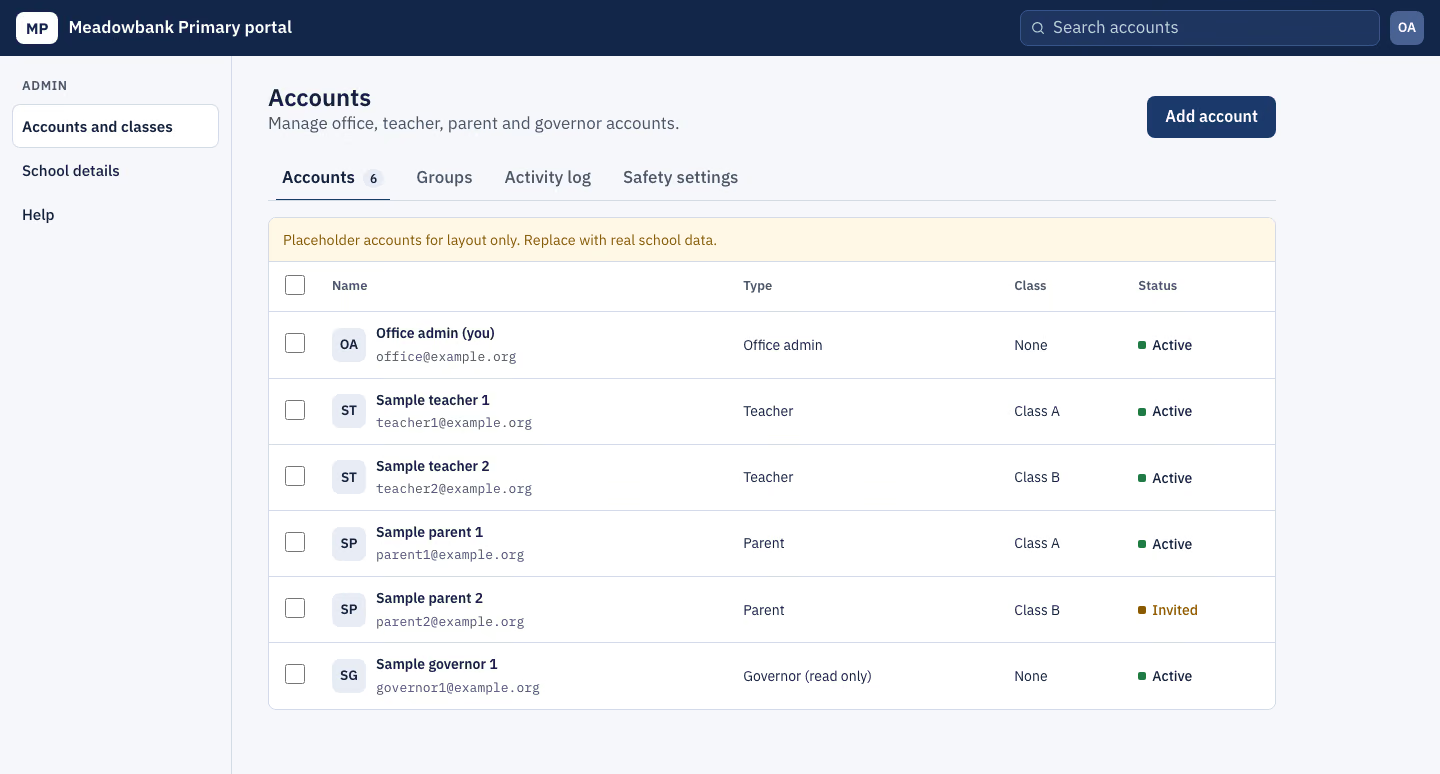
I built the admin settings area as a plain HTML, CSS and JavaScript page in the project folder. The skill's check passes at 390, 768 and 1440px (no overflow, small text, contrast, focus, motion or script-error problems). I looked at the 1440 and 390 screenshots and they read correctly. I did not open the 768 screenshot, and I did not try the dialog, the bulk actions or the other tabs in a browser.

What it does

  • Look: navy and white, very plain.
  • Tabs: Accounts, Groups (classes), Activity log and Safety settings, with keyboard navigation.
  • Account types: office admin, teacher, parent and governor (read only).
  • Bulk actions: tick accounts to get a bar with Move to class, Reset password, Deactivate and Clear.
  • Only teachers and parents belong to a class, so moving anyone else is skipped and the status line says so.
  • Deactivate never touches the signed-in office admin.
  • Add account dialog: name, email, type and class. It checks both the name and the email before adding the row, and the class field is turned off for office admins and governors.
  • Activity log: starts empty and records every change made on the page.
  • Safety settings: three switches and a sign-out timer.
  • Phones: the sidebar becomes a drawer and the tables become cards.
Show more

What it did in run 1

  1. ./brief.md
  2. team-access-console
  3. *
  4. ./.claude/skills/team-access-console/reference/index.html
  5. ./.claude/skills/team-access-console/reference/style.css
  6. ./.claude/skills/team-access-console/reference/script.js
  7. cp .claude/skills/team-access-console/reference/style.css style.css && sed -i '' -e 's/--surface-2:#E9EBEF/--surface-2:#E8ECF4/; s/--ink:#1B1F26/--ink:#14213D/; s/--muted:#5B6270/--muted:#4A5568/; s/--line:#D8DCE2/--line:#D5DBE6/; s/--accent:#2B3340/--accent:#1B3A6B/; s/--em:#2B3340/--em:#1B3A6B/; s/--bar:#20252D/--bar:#12264A/; s/--bg:#F3F4F6/--bg:#F5F7FA/' style.css && sed -i '' -e 's/#2A3039/#1E3560/g; s/#3B424D/#3A5588/g; s/#56606E/#4A6194/g; s/#E3E7ED/#E1E8F3/; s/#EEF1F5/#EAF0FA/; s/rgba(27,31,38,.5)/rgba(18,38,74,.5)/' style.css cat >> style.css <<'EOF' /* Meadowbank additions */ .lg2{width:auto;padding:0 10px;font-size:.95rem} .school{font-weight:600;color:#fff;white-space:nowrap} .bulk select{min-height:36px;border-radius:8px;border:1px solid #B8BEC8;padding:0 8px;background:var(--surface)} .bulk .grp-pick{display:inline-flex;gap:6px;align-items:center} .bulk span.sr-only{margin:-1px} .stt.inactive{color:var(--bad)}.stt.inactive::before{background:var(--bad)} .ptl{display:block;padding:10px 14px;background:#FFF8E6;border-bottom:1px solid var(--line);color:var(--warn);font-size:.9rem;border-radius:8px 8px 0 0} .gtbl{width:100%;border-collapse:collapse;font-size:14px} .gtbl th{text-align:left;font-weight:600;color:var(--muted);font-size:13px;padding:10px 12px;border-bottom:1px solid var(--line)} .gtbl td,.gtbl tbody th{padding:10px 12px;border-bottom:1px solid var(--line);text-align:left;font-weight:400} .gtbl tbody th{font-weight:600} .gtbl tr:last-child td,.gtbl tr:last-child th{border-bottom:0} .log .empty{display:block;padding:14px;grid-template-columns:1fr} .dlg input:disabled,.dlg select:disabled{background:var(--surface-2);color:var(--muted)} .sets li.locked .muted{font-style:normal} @media (max-width:640px){.school{font-size:.9rem}.gtbl thead{display:none}.gtbl,.gtbl tbody,.gtbl tr,.gtbl td,.gtbl th{display:block}.gtbl tr{padding:10px 12px;border-bottom:1px solid var(--line)}.gtbl td,.gtbl tbody th{border:0;padding:2px 0}.gtbl td::before{content:attr(data-l) ": ";color:var(--muted)}} EOF sed -i '' 's/\.mono{font-family:.IBM Plex Mono.,ui-monospace,monospace;/&/' style.css sed -i '' "s/--font-body:'IBM Plex Sans', system-ui, sans-serif}/--font-body:'IBM Plex Sans', system-ui, sans-serif}/" style.css cat > index.html <<'EOF' <!doctype html> <html lang="en"> <head> <meta charset="utf-8"> <meta name="viewport" content="width=device-width, initial-scale=1"> <title>Accounts – Meadowbank Primary portal</title> <meta name="description" content="Office staff manage teacher, parent, governor and office accounts for the Meadowbank Primary portal."> <link rel="preconnect" href="https://fonts.googleapis.com"> <link rel="preconnect" href="https://fonts.gstatic.com" crossorigin> <link rel="stylesheet" href="https://fonts.googleapis.com/css2?family=IBM+Plex+Sans:wght@400;500;600;700&family=IBM+Plex+Mono:wght@400;500&display=swap"> <link rel="stylesheet" href="style.css"> </head> <body> <a class="skip" href="#main">Skip to content</a> <div class="slate"> <header class="bar"> <span class="lg2" aria-hidden="true">MP</span><span class="school">Meadowbank Primary portal</span> <div class="gs"><label class="sr-only" for="gq">Search accounts</label><svg class="ic" width="16" height="16" viewBox="0 0 24 24" fill="none" stroke="currentColor" stroke-width="1.8" stroke-linecap="round" stroke-linejoin="round" aria-hidden="true" focusable="false"><path d="M11 18a7 7 0 1 0 0-14 7 7 0 0 0 0 14M20 20l-4-4"/></svg><input id="gq" type="search" placeholder="Search accounts" data-q></div> <span class="me2" aria-label="Signed in as Office admin (you)">OA</span> <button class="menu-btn" type="button" data-nav-toggle aria-controls="side" aria-expanded="false" aria-label="Menu"><svg class="ic" width="22" height="22" viewBox="0 0 24 24" fill="none" stroke="currentColor" stroke-width="1.8" stroke-linecap="round" stroke-linejoin="round" aria-hidden="true" focusable="false"><path d="M4 7h16M4 12h16M4 17h16"/></svg></button> </header> <div class="adm"> <aside class="side" id="side" aria-label="Admin menu"><p class="grp">Admin</p><nav> <a href="#main" aria-current="page">Accounts and classes</a> <a href="#main">School details</a> <a href="#main">Help</a> </nav></aside> <main id="main"><div class="sl-in"> <div class="sl-h"><div><h1>Accounts</h1><p class="muted">Manage office, teacher, parent and governor accounts.</p></div> <button class="btn btn-primary" type="button" data-invite>Add account</button></div> <div class="tabs" role="tablist" aria-label="Account management"> <button type="button" role="tab" id="t-accounts" aria-controls="p-accounts" aria-selected="true" tabindex="0">Accounts <span class="cnt" data-cnt>0</span></button> <button type="button" role="tab" id="t-groups" aria-controls="p-groups" aria-selected="false" tabindex="-1">Groups</button> <button type="button" role="tab" id="t-activity" aria-controls="p-activity" aria-selected="false" tabindex="-1">Activity log</button> <button type="button" role="tab" id="t-safety" aria-controls="p-safety" aria-selected="false" tabindex="-1">Safety settings</button> </div> <section id="p-accounts" role="tabpanel" aria-labelledby="t-accounts" tabindex="0"> <p class="ptl">Placeholder accounts for layout only. Replace with real school data.</p> <div class="bulk" data-bulk hidden> <span data-picked>0 picked</span> <span class="grp-pick"><label class="sr-only" for="bclass">Class to move to</label><select id="bclass" data-class-list></select><button type="button" class="btn btn-ghost sm" data-bulk-move>Move to class</button></span> <button type="button" class="btn btn-ghost sm" data-bulk-reset>Reset password</button> <button type="button" class="btn btn-ghost sm" data-bulk-off>Deactivate</button> <button type="button" class="btn btn-ghost sm" data-bulk-clear>Clear</button> </div> <table class="mtbl"><thead><tr><th scope="col" class="ck"><input type="checkbox" data-all aria-label="Pick all accounts"></th><th scope="col">Name</th><th scope="col">Type</th><th scope="col">Class</th><th scope="col">Status</th></tr></thead> <tbody data-rows></tbody></table> <p class="muted none" data-none hidden>No accounts match that search.</p> </section> <section id="p-groups" role="tabpanel" aria-labelledby="t-groups" tabindex="0" hidden> <div class="box-x" role="region" aria-label="Classes" tabindex="0"><table class="gtbl"><caption class="sr-only">Classes and how many accounts are in each</caption><thead><tr><th scope="col">Class</th><th scope="col">Teachers</th><th scope="col">Parents</th></tr></thead><tbody data-groups></tbody></table></div> </section> <section id="p-activity" role="tabpanel" aria-labelledby="t-activity" tabindex="0" hidden> <ol class="log" data-log><li class="empty muted" data-empty>Nothing yet. Changes made on this page will be listed here.</li></ol> </section> <section id="p-safety" role="tabpanel" aria-labelledby="t-safety" tabindex="0" hidden> <ul class="sets"> <li><span><b id="s0">Two-step sign-in for office admins</b><span class="muted">Office admins add a code from a phone when they sign in.</span></span><button type="button" class="sw" role="switch" aria-checked="true" aria-labelledby="s0"><span class="tr" aria-hidden="true"></span></button></li> <li><span><b id="s1">Make people choose a new password after a reset</b><span class="muted">A reset password only works once, then they must pick their own.</span></span><button type="button" class="sw" role="switch" aria-checked="true" aria-labelledby="s1"><span class="tr" aria-hidden="true"></span></button></li> <li><span><b id="s2">Parents see only their own child's class</b><span class="muted">Stops parents seeing other classes.</span></span><button type="button" class="sw" role="switch" aria-checked="true" aria-labelledby="s2"><span class="tr" aria-hidden="true"></span></button></li> <li><span><b><label for="tmo">Sign people out after</label></b><span class="muted">How long a session lasts without activity.</span></span><select id="tmo"><option>30 minutes</option><option selected>2 hours</option><option>8 hours</option></select></li> </ul> <p class="ptl" style="border-radius:0 0 8px 8px;border-top:1px solid var(--line);border-bottom:0">These options are placeholders until the school confirms its safety rules.</p> </section> <p class="sr-only" role="status" data-say></p> </div></main></div> <dialog class="dlg" data-dlg aria-labelledby="dlg-h"><form method="dialog" data-form novalidate> <h2 id="dlg-h">Add account</h2> <label for="inm">Full name</label><input id="inm" type="text" autocomplete="off" required aria-describedby="inm-err"><p class="err" id="inm-err" data-err-name></p> <label for="iem">Email address</label><input id="iem" type="email" autocomplete="off" required aria-describedby="iem-err"><p class="err" id="iem-err" data-err></p> <label for="itype">Account type</label><select id="itype"><option>Teacher</option><option>Parent</option><option>Office admin</option><option>Governor (read only)</option></select> <label for="iclass">Class</label><select id="iclass" data-class-list></select> <div class="dlg-a"><button class="btn btn-ghost" type="button" data-cancel>Cancel</button><button class="btn btn-primary" type="submit" value="add">Add account</button></div> </form></dialog> </div> <script src="script.js" defer></script> </body> </html> EOF
  8. cp .claude/skills/team-access-console/reference/style.css style.css && sed -i '' -e 's/--surface-2:#E9EBEF/--surface-2:#E8ECF4/; s/--ink:#1B1F26/--ink:#14213D/; s/--muted:#5B6270/--muted:#4A5568/; s/--line:#D8DCE2/--line:#D5DBE6/; s/--accent:#2B3340/--accent:#1B3A6B/; s/--em:#2B3340/--em:#1B3A6B/; s/--bar:#20252D/--bar:#12264A/; s/--bg:#F3F4F6/--bg:#F5F7FA/' style.css && sed -i '' -e 's/#2A3039/#1E3560/g; s/#3B424D/#3A5588/g; s/#56606E/#4A6194/g; s/#E3E7ED/#E1E8F3/; s/#EEF1F5/#EAF0FA/; s/rgba(27,31,38,.5)/rgba(18,38,74,.5)/' style.css && grep -c 1B3A6B style.css
  9. cat >> style.css <<'EOF' /* Meadowbank additions */ .lg2{width:auto;padding:0 10px;font-size:.95rem} .school{font-weight:600;color:#fff;white-space:nowrap} .bulk select{min-height:36px;border-radius:8px;border:1px solid #B8BEC8;padding:0 8px;background:var(--surface)} .grp-pick{display:inline-flex;gap:6px;align-items:center} .stt.inactive{color:var(--bad)}.stt.inactive::before{background:var(--bad)} .ptl{display:block;padding:10px 14px;background:#FFF8E6;border-bottom:1px solid var(--line);color:var(--warn);font-size:.9rem;border-radius:8px 8px 0 0} .gtbl{width:100%;border-collapse:collapse;font-size:14px} .gtbl th{text-align:left;font-weight:600;color:var(--muted);font-size:13px;padding:10px 12px;border-bottom:1px solid var(--line)} .gtbl td,.gtbl tbody th{padding:10px 12px;border-bottom:1px solid var(--line);text-align:left;font-weight:400} .gtbl tbody th{font-weight:600} .gtbl tr:last-child td,.gtbl tr:last-child th{border-bottom:0} .log li.empty{display:block;padding:14px} .dlg input:disabled,.dlg select:disabled{background:var(--surface-2);color:var(--muted)} .sets-note{border-radius:0 0 8px 8px;border-top:1px solid var(--line);border-bottom:0} @media (max-width:640px){.school{font-size:.9rem}.gtbl thead{display:none}.gtbl,.gtbl tbody,.gtbl tr,.gtbl td,.gtbl th{display:block}.gtbl tr{padding:10px 12px;border-bottom:1px solid var(--line)}.gtbl td,.gtbl tbody th{border:0;padding:2px 0}.gtbl td::before{content:attr(data-l) ": ";color:var(--muted)}} EOF
  10. ./index.html
  11. ./style.css
  12. ./script.js
  13. node .claude/skills/team-access-console/scripts/check.mjs index.html --out check 2>&1 | tail -40
  14. ./check/1440.png
  15. ./check/390.png
  16. Done

10 Nov 2026 · Claude Code 2.1.322 with Claude Sonnet 5.5 · 2 min 10 s · $0.43 of API use

Questions

Is Team Access Console free?

No. Team Access Console costs $9.99 once and stays in your Recaply account, or it comes with the Recaply plan ($19.99 a month), which opens every premium skill and prompt.

Which agents can use Team Access Console?

Claude Code, Codex, Cursor, Gemini CLI, GitHub Copilot and OpenCode.

What do I get when I buy Team Access Console?

A ZIP of the whole skill folder (36 KB): the SKILL.md your agent follows and its 6 other files, the references, templates and scripts it uses. You download it from this page whenever you need it, and install it in Claude Code, Codex, Cursor, Gemini CLI, GitHub Copilot and OpenCode. The Recaply plan opens it too, with every other premium skill and prompt.

How do I install Team Access Console?

Buy it, then download the ZIP from this page. For Claude Code, unzip it into .claude/skills/ in your project. For Codex, Cursor and Gemini CLI, unzip it and run npx skills add ./team-access-console with your agent's flag.

What do I get from Team Access Console?

One HTML file with its CSS inside: no build step, no framework. An admin console for members, roles and settings. Checked at phone and desktop widths.

What does Team Access Console need?

Node 20+ and Chrome, and no API key. Each use costs nothing beyond your agent.

How big is Team Access Console?

7 files, about 26,356 tokens in all. The SKILL.md is about 2,327 tokens, and your agent reads it only when the job fits.

What does a run cost?

Our 1 runs took 2 min 10 s to 2 min 10 s and $0.43 to $0.43 of API use each, in Claude Code with claude-sonnet-5-5. On a Claude plan, a run counts toward your usage instead.

Do I have to name Team Access Console to use it?

Type /team-access-console first to make sure it loads. Without it, Claude Code may judge a small job simple enough to do without the skill.