Skip to content

DirectorySkills

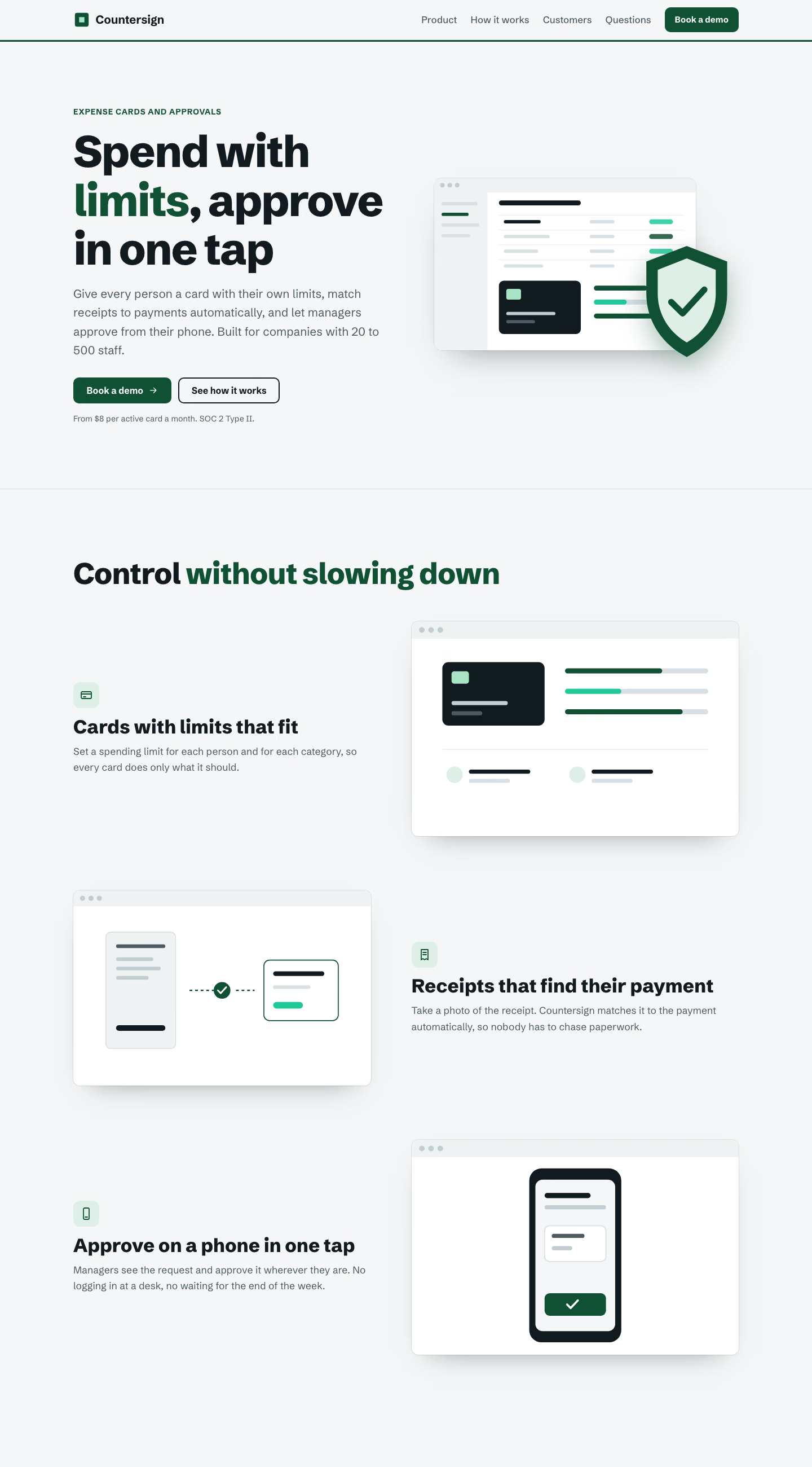
Secure vault fintech landing page: index.html at desktop width, made in this run
Run 1Secure vault fintech landing page“Landing page for Countersign, our expense approval product. Use brief.md.”
Runs in
  • Claude Code
  • Codex
  • Cursor
  • Gemini CLI
  • GitHub Copilot
  • OpenCode
Generates with
Your agent's model
Tested with
Claude Code 2.1.322Claude Sonnet 5.51 real run, 12 Nov
Needs
Node 20+Chrome
Licence
Recaply licence

Secure Vault Fintech Landing Page

A steel-grey and emerald fintech landing page about security: shield hero, feature rows, figures, steps and FAQ.

$9.99once, yours to keep

Builds a fintech landing page with a secure-vault style into your own project: cool steel grey and deep emerald, a shield and dashboard in the hero, three feature rows, figures on a dark band, three steps, quotes, plain answers about money and a legal note. Plain HTML, CSS and JavaScript, or matched to React, Next.js, Vue, Svelte, Astro or Tailwind when the project uses them. Comes with a working reference and a check that screenshots it at phone, tablet and desktop widths and flags sideways overflow, text under 12px, missing alt text and names, low contrast, no focus styles, motion that ignores reduced motion, leftover sample words and emoji icons. Use when a business payments, treasury, custody, payroll or security-heavy finance product needs a landing page, or someone asks for a steel, vault-like, secure look.

By RecaplyUpdated 12 Nov

Install Secure Vault Fintech Landing Page

After the download, ask your agent to add it, or run the line yourself.

Read https://recaply.co/skills/secure-vault-fintech-landing-page/install.md and follow it to install the secure-vault-fintech-landing-page skill from secure-vault-fintech-landing-page.zip.

Paste it into your agent. It reads our install steps, finds the ZIP you downloaded and adds the skill for you.

New to skills? How to install a skill

Similar skills

All 735 skills

Who Secure Vault Fintech Landing Page is for

What you get

  • One HTML file with its CSS inside: no build step, no framework
  • A fintech landing page with a secure-vault style
  • Checked at phone and desktop widths

Good fit

  • When a business payments, treasury, custody, payroll or security-heavy finance product needs a landing page

Not for

  • An app with a backend, sign-in or a database
  • Copying another company's site

About this skill

You say

Landing page for Countersign, our expense approval product. Use brief.md.

It said back

The Countersign landing page is built and the check passes: no sideways overflow, no text under 12px, alt text, contrast, focus styles, reduced motion and sample-word checks all clear. I looked at the 390px and 1440px screenshots and saw nothing cut off or overlapping. I didn't open the 768px screenshot.

Files (in work1/): index.html, style.css, script.js, og.svg. It's plain HTML, CSS and JavaScript because the folder had no existing project. Screenshots are in /tmp/cs-check/ (390.png, 768.png, 1440.png).

Show more

What it did in run 1

  1. ls -la && cat brief.md
  2. secure-vault-fintech-landing-page
  3. cd ./.claude/skills/secure-vault-fintech-landing-page && ls -R reference scripts | head -30 && wc -c reference/* && cat reference/index.html && node scripts/check.mjs --ready
  4. ./.claude/skills/secure-vault-fintech-landing-page/reference/style.css
  5. ./.claude/skills/secure-vault-fintech-landing-page/reference/script.js
  6. W=. cp $W/.claude/skills/secure-vault-fintech-landing-page/reference/style.css $W/style.css cat > $W/script.js <<'EOF' // Marks JS on, phone menu, reveal on scroll (skipped with reduced motion), demo form confirmation. document.documentElement.classList.add('js'); const reduceMotion = window.matchMedia('(prefers-reduced-motion: reduce)'); for (const b of document.querySelectorAll('[data-nav-toggle]')) { const menu = document.getElementById(b.getAttribute('aria-controls')); const set = (open) => { b.setAttribute('aria-expanded', String(open)); menu && menu.classList.toggle('open', open); }; b.addEventListener('click', () => set(b.getAttribute('aria-expanded') !== 'true')); document.addEventListener('keydown', (e) => { if (e.key === 'Escape' && b.getAttribute('aria-expanded') === 'true') { set(false); b.focus(); } }); menu && menu.addEventListener('click', (e) => { if (e.target.closest('a')) set(false); }); } (() => { const els = document.querySelectorAll('.reveal'); if (reduceMotion.matches || !('IntersectionObserver' in window)) { els.forEach((e) => e.classList.add('in')); return; } const io = new IntersectionObserver((entries) => { for (const en of entries) if (en.isIntersecting) { en.target.classList.add('in'); io.unobserve(en.target); } }, { threshold: 0.12, rootMargin: '0px 0px -5% 0px' }); els.forEach((e) => io.observe(e)); })(); for (const y of document.querySelectorAll('[data-year]')) y.textContent = new Date().getFullYear(); // Demo form: not connected to a service yet. Replace this handler with a real submit (CRM, email or scheduling link). for (const f of document.querySelectorAll('[data-form]')) f.addEventListener('submit', (e) => { e.preventDefault(); const s = f.querySelector('.form-status'); if (s) s.textContent = 'Thanks. Your request is noted, and we will be in touch about a time.'; }); EOF cat >> $W/style.css <<'EOF' .hero-note{max-width:46ch} .stats .stat dd{color:#F4F6F7} .demo-form{display:grid;gap:.9rem;max-width:460px;margin:2rem auto 0;text-align:left} .demo-form .field{color:var(--cta-ink)} .demo-form .field input{--field-bg:#fff;color:var(--ink)} .demo-form .btn{width:100%} .demo-form .form-status{color:var(--cta-ink);text-align:center} .cta-box .btn-primary{background:#fff;color:var(--ink)} .cta-box .btn-primary:hover{box-shadow:0 6px 18px -8px #000} .cta-box :focus-visible{outline-color:#fff} .cta-box em{color:#7FD8AE} .legal{margin-top:.75rem;max-width:80ch} .avatar-i{display:grid;place-items:center;background:var(--chip-bg);color:var(--accent);font-weight:800;font-size:1rem;letter-spacing:.02em} .row-art .art{width:100%;height:auto;border-radius:var(--radius);box-shadow:0 24px 50px -34px rgba(17,26,31,.5),0 0 0 1px var(--line)} EOF cat > $W/og.svg <<'EOF' <svg xmlns="http://www.w3.org/2000/svg" viewBox="0 0 1200 630"><rect width="1200" height="630" fill="#111A1F"/><rect width="1200" height="8" fill="#0F5132"/><rect x="80" y="90" width="48" height="48" rx="8" fill="#0F5132"/><rect x="95" y="105" width="18" height="18" fill="#A7E3C4"/><text x="146" y="128" font-family="Arial,sans-serif" font-size="40" font-weight="700" fill="#F4F6F7">Countersign</text><text x="80" y="300" font-family="Arial,sans-serif" font-size="76" font-weight="800" fill="#F4F6F7">Spending limits set.</text><text x="80" y="390" font-family="Arial,sans-serif" font-size="76" font-weight="800" fill="#7FD8AE">Approvals in one tap.</text><text x="80" y="500" font-family="Arial,sans-serif" font-size="32" fill="#C2CDD2">Expense cards and approvals for companies with 20 to 500 staff</text></svg> EOF
  7. W=.; cp $W/.claude/skills/secure-vault-fintech-landing-page/reference/style.css $W/style.css && ls $W
  8. ./script.js
  9. ./og.svg
  10. cd . && cp .claude/skills/secure-vault-fintech-landing-page/reference/style.css ./style.css; ls
  11. cp ./.claude/skills/secure-vault-fintech-landing-page/reference/style.css ./style.css && echo copied
  12. ./style.css
  13. ./index.html
  14. S=.; node $S/.claude/skills/secure-vault-fintech-landing-page/scripts/check.mjs $S/index.html --out /tmp/cs-check 2>&1 | tail -40
  15. node ./.claude/skills/secure-vault-fintech-landing-page/scripts/check.mjs ./index.html --out /tmp/cs-check 2>&1 | tail -40
  16. ./index.html
  17. ./index.html
  18. node ./.claude/skills/secure-vault-fintech-landing-page/scripts/check.mjs ./index.html --out /tmp/cs-check 2>&1 | tail -20
  19. /tmp/cs-check/1440.png
  20. /tmp/cs-check/390.png
  21. Done

12 Nov 2026 · Claude Code 2.1.322 with Claude Sonnet 5.5 · 3 min 2 s · $0.56 of API use

Questions

Is Secure Vault Fintech Landing Page free?

No. Secure Vault Fintech Landing Page costs $9.99 once and stays in your Recaply account, or it comes with the Recaply plan ($19.99 a month), which opens every premium skill and prompt.

Which agents can use Secure Vault Fintech Landing Page?

Claude Code, Codex, Cursor, Gemini CLI, GitHub Copilot and OpenCode.

What do I get when I buy Secure Vault Fintech Landing Page?

A ZIP of the whole skill folder (41 KB): the SKILL.md your agent follows and its 6 other files, the references, templates and scripts it uses. You download it from this page whenever you need it, and install it in Claude Code, Codex, Cursor, Gemini CLI, GitHub Copilot and OpenCode. The Recaply plan opens it too, with every other premium skill and prompt.

How do I install Secure Vault Fintech Landing Page?

Buy it, then download the ZIP from this page. For Claude Code, unzip it into .claude/skills/ in your project. For Codex, Cursor and Gemini CLI, unzip it and run npx skills add ./secure-vault-fintech-landing-page with your agent's flag.

What do I get from Secure Vault Fintech Landing Page?

One HTML file with its CSS inside: no build step, no framework. A fintech landing page with a secure-vault style. Checked at phone and desktop widths.

What does Secure Vault Fintech Landing Page need?

Node 20+ and Chrome, and no API key. Each use costs nothing beyond your agent.

How big is Secure Vault Fintech Landing Page?

7 files, about 31,889 tokens in all. The SKILL.md is about 2,575 tokens, and your agent reads it only when the job fits.

What does a run cost?

Our 1 runs took 3 min 2 s to 3 min 2 s and $0.56 to $0.56 of API use each, in Claude Code with claude-sonnet-5-5. On a Claude plan, a run counts toward your usage instead.

Do I have to name Secure Vault Fintech Landing Page to use it?

Type /secure-vault-fintech-landing-page first to make sure it loads. Without it, Claude Code may judge a small job simple enough to do without the skill.