 Microsoft
Generative AI for Beginners
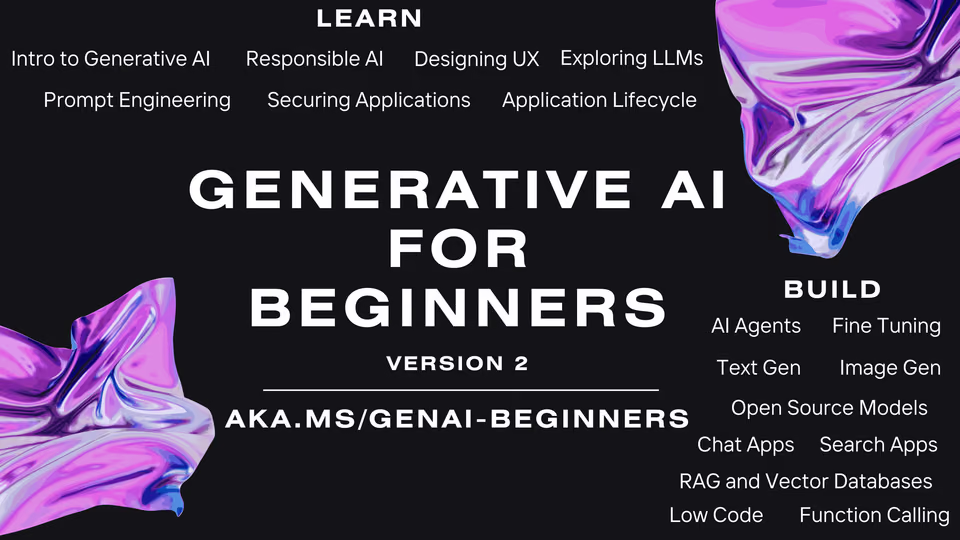
Build generative AI apps across 21 lessons with Python and TypeScript samples, for developers new to the field.
Taught by Microsoft Cloud Advocates at MicrosoftFreeVerified
- From Course Setup to Building with Meta Models
- 22 lessons
- OpenAI's GPT API for apps, agents and voice
 OpenAI Platform
- Before you startBasic Python or TypeScript helps; a GitHub account and access to a model service (Azure OpenAI, Microsoft Foundry, OpenAI API or Foundry Local).
- Beginner level
- 21 lessons
- Self-paced
What you’ll learn
- Learn what generative AI and LLMs are, and how to pick the right model for a task.
- Write better prompts, from the basics to advanced techniques.
- Build text generation, chat, search, image generation and low-code AI apps.
- Add function calling, RAG with vector databases, open source models and AI agents to an app.
- Plan for real use: responsible AI, UX design, security, the app lifecycle and fine-tuning.
Skills you’ll gain
Tools you'll learn
Details to know
- No certificateMicrosoft lists none
- Free to takeNo fee on github.com
- Taught in English55 languages available
- VerifiedOct 2026
Lessons
21 lessons
Generative AI for Beginners is an open-source course from Microsoft Cloud Advocates, published on GitHub and now in its third version. It has 21 lessons after a setup lesson, and each one stands alone, so you can start with any topic.
Learn lessons explain a concept, and Build lessons add code in Python and TypeScript for Azure OpenAI, Microsoft Foundry Models or the OpenAI API. Every lesson pairs a written guide with a short video, though some videos are still to come, and links to further reading.
Across 21 lessons and a setup lesson, you will:
- Course Setup: Fork the repo, open it in a codespace or on your machine, and connect a model service.
- Lessons 01 to 03: Learn what LLMs are, how to compare and choose one, and how to use them responsibly.
- Lessons 04 and 05: Write prompts from the basics up to few-shot, chain-of-thought and self-refine.
- Lessons 06 to 09: Build text generation, chat, embeddings search and image generation apps.
- Lessons 10 and 11: Build low-code apps in Power Platform and connect models to your code with function calling.
- Lessons 12 to 14: Design the user experience, secure the app and manage it through its lifecycle.
- Lessons 15 to 18: Ground answers with RAG and vector databases, use open models, build agents and fine-tune.
- Lessons 19 to 21: Work with small language models, Mistral models and Meta's Llama models.
Applied learning project
Nine Build lessons come with code samples, and many lessons end in an assignment, often set at the course's education startup. Several lessons include reference solutions to check your work against.
- Recipe generator: Build a text app that suggests recipes, then add filters and a shopping list.
- Video search: Search transcripts of Microsoft's AI Show videos with embeddings and jump to the answer.
- Monument images: Generate images of landmarks in new settings, with metaprompts as guardrails.
- Low-code apps: Build a student assignment tracker in Power Apps and an invoice processing flow in Power Automate.
- Course finder: Extend a chatbot's function calls so it finds courses for learners and handles errors.
- Agent meeting: Simulate a startup meeting where department agents question your product pitch.
By the end, you can build small generative AI apps that use prompts, embeddings, RAG, function calling and agents, with responsible AI and security in mind.
Course SetupLesson 1Lesson details
What you’ll learn
- Fork the repo and open it in GitHub Codespaces, or run it on your own machine.
- Set up keys for Azure OpenAI or the OpenAI API in a .env file.
Introduction to Generative AI and LLMsLesson 2Lesson details
What you’ll learn
- Trace how AI grew from statistical methods and neural networks into today's generative models.
- Learn how large language models produce text and where they fit in education.
- Sketch your own AI startup idea in a 300-word write-up.
Exploring and comparing different LLMsLesson 3Lesson details
What you’ll learn
- Compare model types: open and proprietary, embedding, image and text, encoder-decoder and decoder-only.
- Test and iterate on models to pick one for your use case.
- Choose between prompting with context, RAG, fine-tuning or training your own model.
Using Generative AI ResponsiblyLesson 4Lesson details
What you’ll learn
- Spot risks such as hallucinations, harmful content and unfair output.
- Measure and reduce harms, and keep a responsible AI solution running well.
Understanding Prompt Engineering FundamentalsLesson 5Lesson details
What you’ll learn
- Learn what prompt engineering is and why the same prompt behaves differently across models.
- Build prompts from instructions, primary content, examples, cues and templates.
- Practice in a Jupyter notebook against an OpenAI endpoint.
Creating Advanced PromptsLesson 6Lesson details
What you’ll learn
- Apply zero-shot, few-shot, chain-of-thought, generated knowledge and least-to-most prompting.
- Get the model to critique and refine its own answers.
- Control how varied the output is with temperature.
Building Text Generation ApplicationsLesson 7Lesson details
What you’ll learn
- Build your first text generation app with the openai library.
- Turn it into a recipe generator with filters and a shopping list.
- Adjust tokens and temperature to change the output.
Building Chat ApplicationsLesson 8Lesson details
What you’ll learn
- Plan how to add chat to an existing system with SDKs and APIs.
- Customize a chat app for one domain and track metrics for its quality.
- Work through exercises from first chat prompts to classifying and summarizing text.
Building Search Apps Vector DatabasesLesson 9Lesson details
What you’ll learn
- Tell semantic search from keyword search.
- Turn text into embeddings and compare them with cosine similarity.
- Build a search app that finds the point in a video that answers a question.
Building Image Generation ApplicationsLesson 10Lesson details
What you’ll learn
- Generate images in Python with the gpt-image model family.
- Edit images and set limits on what gets made with metaprompts.
Building Low Code AI ApplicationsLesson 11Lesson details
What you’ll learn
- Use Copilot in Power Apps and Power Automate to build from plain-language prompts.
- Build a student assignment tracker and an AI invoice processing flow.
- Create agents in Microsoft Copilot Studio.
Integrating External Applications with Function CallingLesson 12Lesson details
What you’ll learn
- Learn what function calling is for and where it helps.
- Set up a function call with the Azure OpenAI Service.
- Wire function calls into a chatbot that finds courses for learners.
Designing UX for AI ApplicationsLesson 13Lesson details
What you’ll learn
- Design for usability, reliability, accessibility and a pleasant experience.
- Build trust with explainability and user control, and collect feedback.
Securing Your Generative AI ApplicationsLesson 14Lesson details
What you’ll learn
- Learn the main threats and risks to AI systems.
- Protect data and test your app with AI red teaming.
The Generative AI Application LifecycleLesson 15Lesson details
What you’ll learn
- Learn how LLMOps differs from MLOps.
- Follow the lifecycle from ideation through building to running the app.
- Track quality, harm, honesty, cost and latency with tools such as PromptFlow.
Retrieval Augmented Generation (RAG) and Vector DatabasesLesson 16Lesson details
What you’ll learn
- Ground a model's answers in your own data with retrieval augmented generation.
- Store embeddings in a vector database, then retrieve and re-rank results.
- Measure how well the app answers with evaluation metrics.
Open Source Models and Hugging FaceLesson 17Lesson details
What you’ll learn
- Learn what makes a model open source and what open models offer.
- Explore Llama 2, Mistral and Falcon on Hugging Face and the Microsoft Foundry catalog.
AI AgentsLesson 18Lesson details
What you’ll learn
- Learn what AI agents are and how they keep state and use tools.
- Compare LangChain, AutoGen, Microsoft Agent Framework, TaskWeaver and JARVIS.
- Build a meeting simulation where department agents question your product pitch.
Fine-Tuning LLMsLesson 19Lesson details
What you’ll learn
- Learn what fine-tuning is and when it pays off over prompting or RAG.
- Fine-tune a model on Microsoft Foundry, which uses LoRA under the hood.
- Walk through a fine-tuning tutorial of your choice.
Building with SLMsLesson 20Lesson details
What you’ll learn
- Learn how small language models differ from large ones and where they fit.
- Run Microsoft's Phi-3 and Phi-3.5 models through cloud APIs or locally with ONNX Runtime.
Building with Mistral ModelsLesson 21Lesson details
What you’ll learn
- Compare Mistral Large, Mistral Small and Mistral NeMo and what each is for.
- Run code samples, including RAG with Mistral Large 2 and a tokenizer comparison.
Building with Meta ModelsLesson 22Lesson details
What you’ll learn
- Explore Llama 3.1 and Llama 3.2 and what each suits.
- Try native function calling and image input in code that runs on Llama 3.3 and Llama 4.
FAQs
Do I get a certificate?
No. Microsoft does not list a certificate for this course.
What do I need before I start?
Basic Python or TypeScript helps; a GitHub account and access to a model service (Azure OpenAI, Microsoft Foundry, OpenAI API or Foundry Local).
Which tools does it teach?
OpenAI Platform: OpenAI's GPT API for apps, agents and voice.
See the toolsWho makes it?
Taught by Microsoft Cloud Advocates at Microsoft. Recaply lists 1 course from Microsoft.
More courses
See all
 AnthropicBuilding with the Claude API10 sections · CertificateFree
 Claude
 HumanLayer12-Factor AgentsIntermediate · 14 chaptersFree
 AnthropicClaude Code in ActionIntermediate · 5 sections · CertificateFree
 Claude Code

 Hugging FaceHugging Face AI Agents CourseAll levels · 12 units · CertificateFree
 Smolagents