
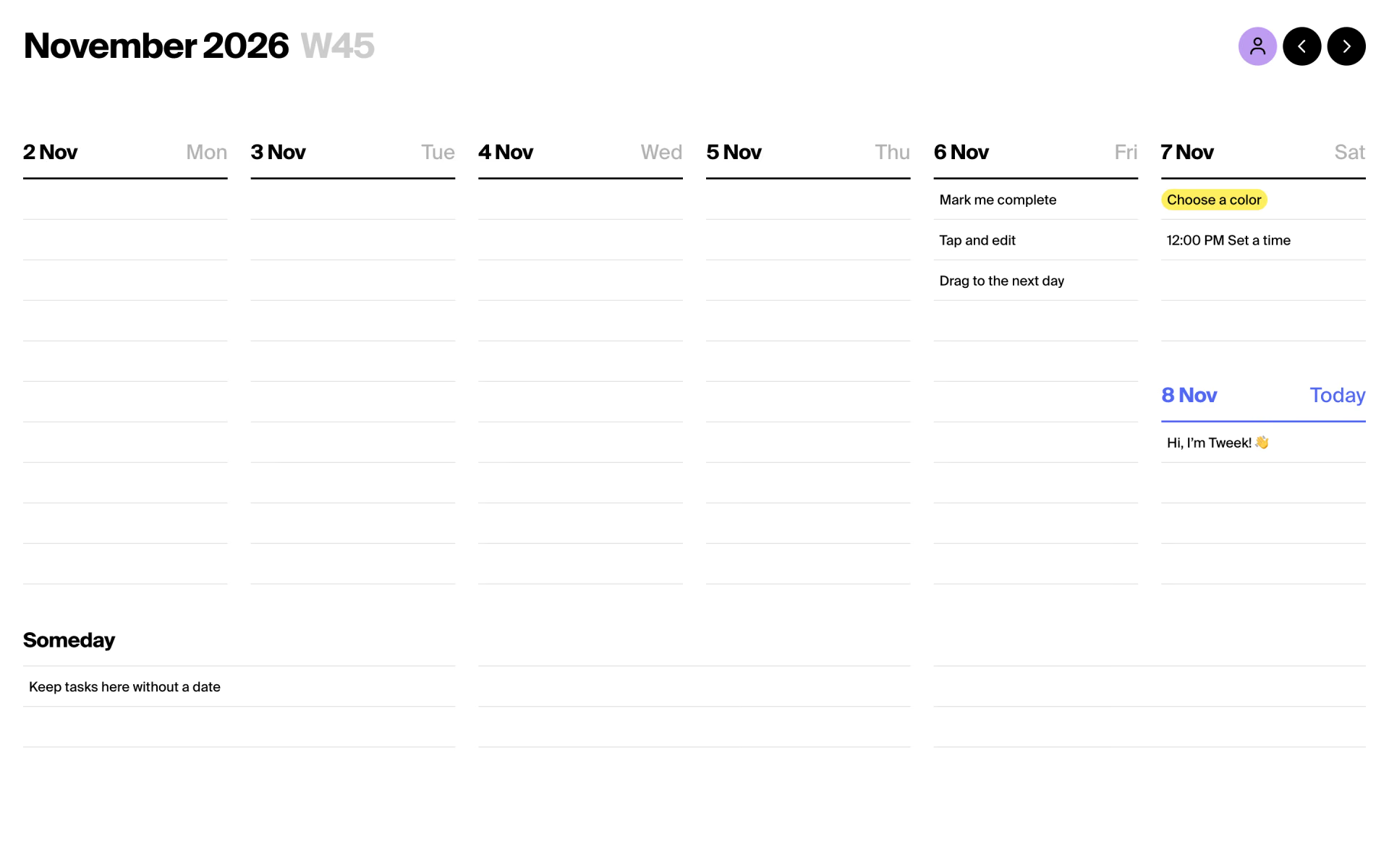
What is Tweek?
Shows a whole week of tasks on one screen like a paper diary, with shared calendars and sync.
Who is Tweek best for?
Tweek is best for people and small teams who plan tasks week by week and want a calendar as simple as paper.
Planning on a weekly view
The default view lays each day's tasks side by side, and anything left undone rolls to the next day.
Couples and families
Shared calendars are free, and the Family plan puts up to five people on Premium for one payment.
Busy calendars
Premium shows Google, Outlook and Apple calendar events, plus any .ics feed, next to your tasks.
Paper planner fans
A printable weekly template lets you plan on paper or print the week you planned online.
How much does Tweek cost?
Tweek has a free plan with one active calendar; Premium is $5.99 a month or $49.99 a year for one person, and Family is $9.99 a month for up to five people.
- 1 active calendar and 2 custom colors
- Share calendars with any number of people
- API and MCP access with a lower quota
- Unlimited calendars and colors
- Google, Outlook and Apple calendar sync
- Subtasks, reminders and recurring tasks
- Premium for up to 5 people
- Each person keeps their own account
- Sold on the Tweek website only
Billed yearly, Individual is $49.99 and Family $89.99. The yearly Individual plan has a 14-day free trial for new subscribers; the monthly and Family plans start right away. Individual can also be bought in the App Store or Google Play. Full pricing on tweek.so. We checked these prices on .
How do readers rate Tweek?
No one has rated Tweek yet. Be the first.
Sign in to rate. One rating per account.
How do I connect Tweek to my AI agent?
Tweek MCP is Tweek's official MCP server. Add it to your agent once, then ask it to add and move to-dos in your Tweek weekly planner.
Connects your agent to your Tweek calendar and to-do lists, so it can add tasks to a day, shift them to another week and tell you what is planned.
$ claude mcp add --transport http tweek https://tweek.so/mcp
Claude Code connects to Tweek over the web.
Run /mcp and sign in to Tweek in the browser.
Then ask your agent
- Runs
- On the web
- Sign-in
- OAuth
- Checked
- Answered 13 Nov
- Guide
- tweek.so
Questions about Tweek
What is Tweek?
Shows a whole week of tasks on one screen like a paper diary, with shared calendars and sync.
Who is Tweek for?
Tweek is best for people and small teams who plan tasks week by week and want a calendar as simple as paper.
Is Tweek free?
Yes. Tweek has a free plan: 1 active calendar and 2 custom colors.
How much does Tweek cost?
Tweek's paid plans are Individual at $5.99 per month and Family at $9.99 per month.
Does Tweek have an MCP server?
Yes. Tweek MCP is Tweek's official MCP server, so agents such as Claude Code, Cursor, Codex and GitHub Copilot can add and move to-dos in your Tweek weekly planner. Tweek runs it on the web and you sign in with your Tweek account.
Where can I try Tweek?
On its official website, tweek.so.
Does Tweek work on iPhone and Android?
Yes. Tweek runs in any web browser, on iPhone and iPad, on Android and on Mac, and one account keeps your calendars in sync across all of them.

 Morgen

 Socra

 QTR

 Ohai
 Tilly
 Manage